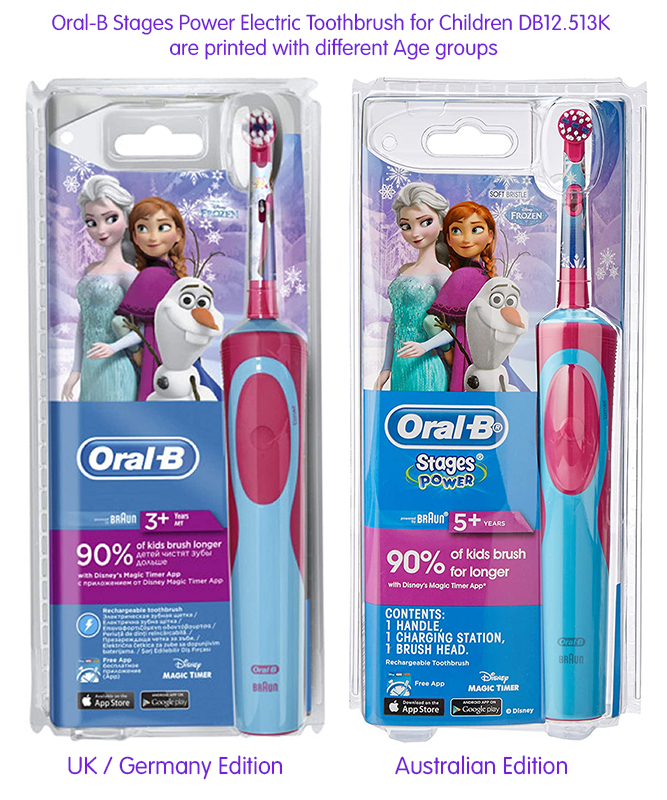
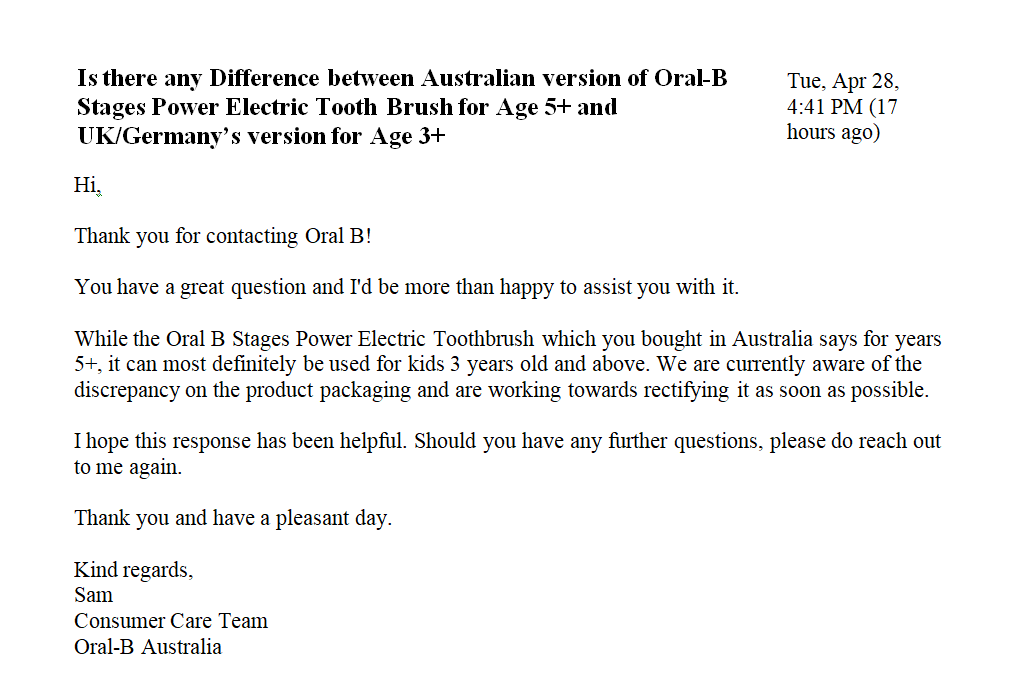
The Australian version of DB4510K and D12.513K were printed with Age 5+ on the packaging, while the UK, Germany and China version all printed with Age 3+.
We had written to Oral-B Australia, and get the following reply.
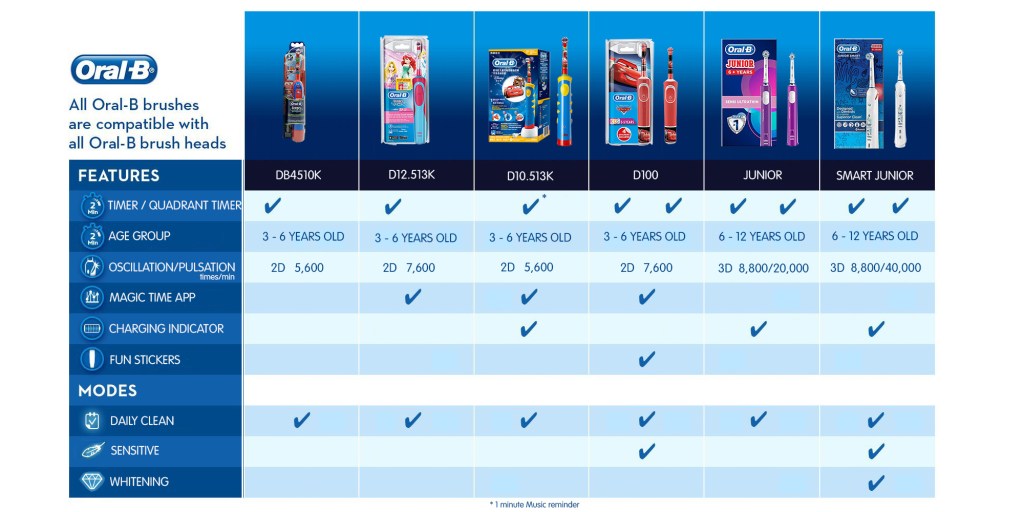
The official age group recommended by Oral-B for children’s electric toothbrush are as follow:
Oral-B had clarified that their range age is from 3+ through 6 years old, there is no individual product for Age 3, 4, 5 or 6 years old.
All WalkingPad models from A1, A1 Pro, P1, C1, and R1 are all manufactured by KingSmith Technology Co., Ltd.
In 2016, Beijing KingSmith Technology Co., Ltd joined the Xiaomi ecological chain system and became a member of the Xiaomi Ecological Chain Enterprise, Starting with the WalkingPad brand.
The first 2 models released, A1 and A1 Pro, were included and operated under Xiaomi’s own Mijia / Mi Home App, where up to 600+ different smart devices are managed and controlled under the Xiaomi Ecological Chain Enterprise agreements.
Xiaomi made investments into hundreds of these Xiaomi Ecological Chain Enterprise, KingSmith being one of them, and incorporate many of these products all under one roof and managed via their Mijia App.
Most of these products were marketed under Xiaomi’s Mijia brandings.
WalkingPad models released later, C1 and R1 were not included under the Mijia Xiaomi ecological chain system.
Instead, KingSmith developed their own App, and the newer models are now operating and managed under these new apps.
C1 is using WalkingPad App.
R1 and R1 Pro is using the KingSmith new KS Fit App.
WalkingPad A1 & A1 Pro gives you a new way to enjoy sports
KingSmith WalkingPad A1 & A1 pro
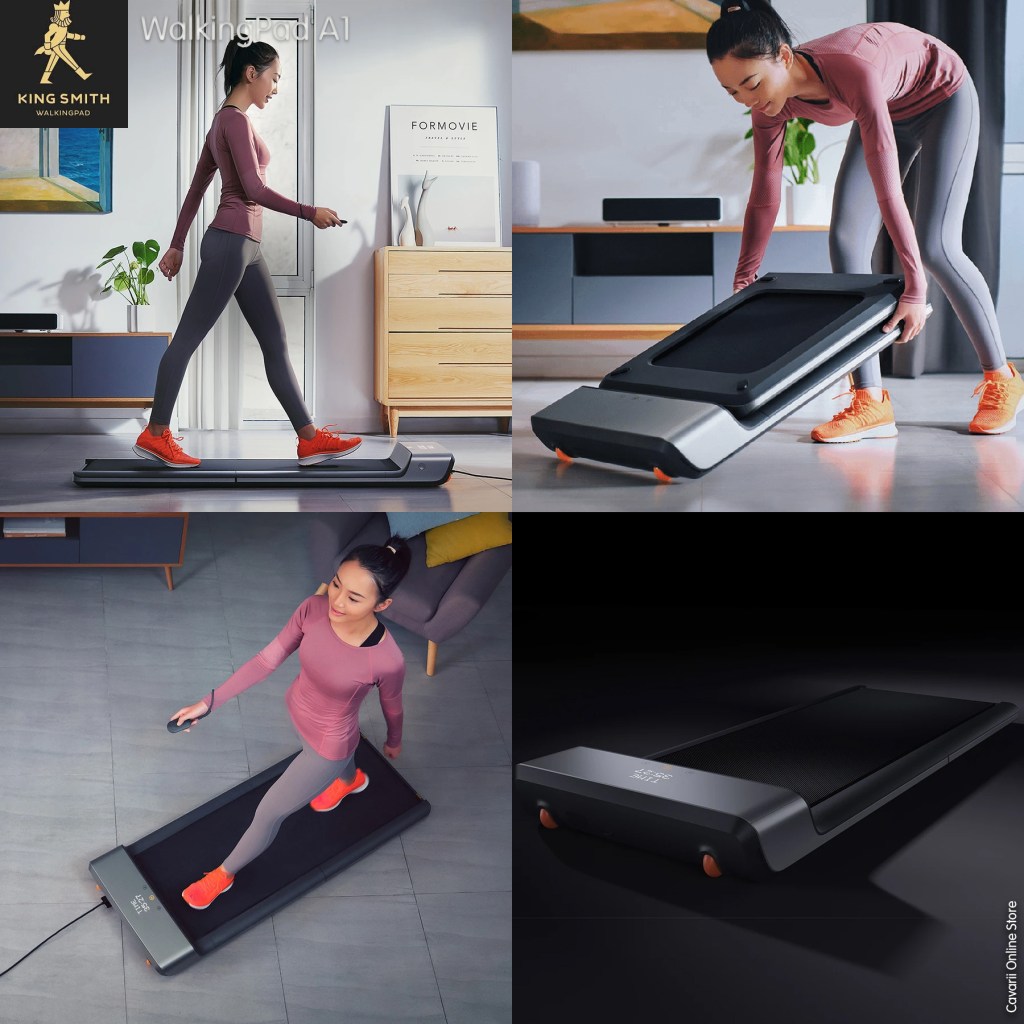
Traditional fitness equipment occupies a lot of home space, whether you have a small or big apartment, you simply don’t want a treadmill that takes too much space.
Storing WalkingPad never becomes a burden the way that bulkier exercise equipment can be.
Put the WalkingPad A1 at home or in the office, you can walk at any time, any weather, any place, fast or slow, enjoy rest and quiet walking without leaving home!
Folding design patent, less than half a square meter
Noise reduction does not disturb, enjoy a quiet moment of exercise.
Footstep Speed control sensor, foot feel more comfortable.
Worry-free installation, Easy start without installation.
The WalkingPad looks like an ordinary treadmill with a regular jogging track, although it does not particularly run. The speed range is from 0.5 to 6 kilometers per hour – this is the maximum quickest step. It has a weight of 28 kg and supports a maximum load of 90 Kg, the blade has a dimension of 1200×415 mm.
It is made of aluminum alloy and high-density elastic material. On the front, we can find an LED screen that provides information about the exercise time and the speed reached. It offers two modes of movement: For beginners, Xiaomi recommends choosing a fixed speed mode, which can be adjusted using the wireless console from the kit. In automatic mode, the track is accelerated if the user moves to the front edge, and slows down if stepping backward.
WalkingPad A1 convinces with a design that has been specially designed for training at home. It is easy to use and quickly stored away
WalkingPad’s unique product design revolutionizes the traditional steel frame structure to create a fresh and brand new look. It utilizes IML surface processing to create a metallic finish front panel to complete the matte body surface. These modern design elements help the WalkingPad blend seamlessly into your home’s décor.
Manual and Automatic
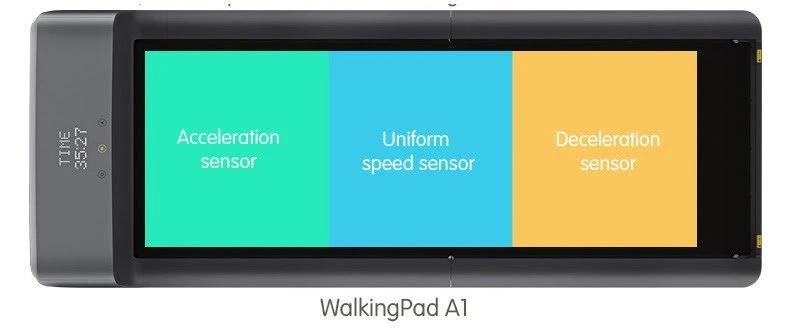
WalkingPad has two exercise modes – M, manual mode, and A, automatic mode. As a beginner, you can use the remote control to operate WalkingPad in manual mode. As a seasoned exerciser, you can control the speed through our patented Adaptive Speed Control system. In this mode, you walk at your own desired pace and WalkingPad can adapt its speed to suit you.
Multiple security protection and visualized walking data
When Off – Clean as a metal slate, When On – Clear as a dashboard
WalkingPad features a simple and clean minimalist design. The LED display is embedded behind the low transmittance ABS panel’s surface. The panel looks completely bare when WalkingPad is turned off. The light has a crystal clear glow when WalkingPad is turned on. With the child lock protection, overload protection, auto standby, and novice speed limit functions, you can rest assured to use this WalkingPad. By connecting with the WalkingPad APP or through the LED light on the dashboard, you can see the data for each walk, it quantifies and urges you to exercise.
Adaptive speed control
With the help of pressure sensors embedded in the WalkingPad base, the patented Adaptive Speed Control technology can precisely measure the user‘s preferred speed. Through sensing different foot drops and posture changes, WalkingPad adapts immediately with acceleration, deceleration, or constant steady speed, it ultimately liberates your hands and offers a truly free exercise.
You can operate the WalkingPad A1 like a standard treadmill with just a few minor differences. You can operate the WalkingPad in two different modes: manual and automatic.
You can turn the machine on and off either on the pad itself or on the remote control. You can also use the remote control to adjust the pace of your workout. Alternatively, you can rely on the treadmill’s built-in sensors to adjust the speed of your training session automatically: start running closer to the front zone of the pad to increase the speed and move closer to the end to decrease the speed. In automatic mode, you can also turn on the walking pad by just stepping onto it and turn the pad off by simply stepping off it.
Control your WalkingPad as easy as operating a TV
In Manual mode, you can operate WalkingPad with the remote control. This includes all necessary functions such as toggling mode, acceleration, and deceleration. It helps beginners to familiarize themselves with WalkingPad and use it safely, conveniently, and efficiently.
A comfortable walking experience
WalkingPad offers an elastic and comfortable low impact running surface with a strong grip. It is like a plastic runway that protects your joints. The high-density fiberboard walking deck carries a layer of cushioning soft gel which is also extremely smooth, providing a comfortable walking feeling for you to continue walking without the slightest setback.
Lightweight, strong construction
WalkingPad frame structure is composed of aluminum alloy to maximize its integrity, capacity, and endurance. Aluminum alloy is incredibly strong but also lightweight. Our choice of material allows WalkingPad to be easy to move and store.
28 KG / 62 LBS NET WEIGHT
110 KG / 240 LBS WEIGHT CAPACITY
Thin Design
Just 57mm / 2.24 in from the ground An ultra-thin, compact design that maximizes safety PC minimizes noise.
Specifications
Product Name:Kingsmith WalkingPad A1 Working Dimensions:1432 x 547 * 129mm / 56.5” x 21.5”x5” Folded Dimensions:822 x 547 * 129mm / 32.5” * 21.5”x5” Walking Surface:1200 x 415mm / 47” * 16.5” Gross Weight:31kg / 68 lbs Net Weight:28kg / 62 lbs Maximum Capacity:100kg / 220 lbs Minimum Speed:0.5km/h / 0.3mph Maximum Speed:6.0km/h / 3.75mph Mode:Standby, Manual, Automatic
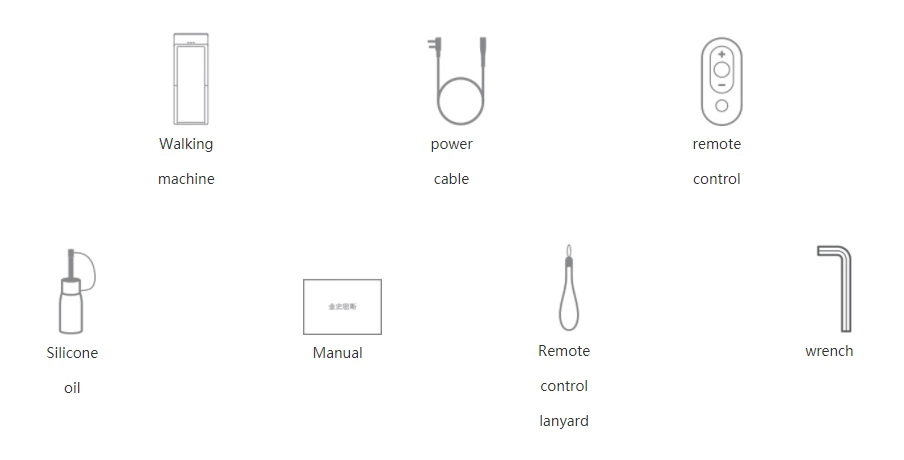
Packing List
The WalkingPad : Mijia companion app
One of the major strengths of Xiaomi products is the fact that most of them are integrated in the Xiaomi ecosystem. It’s the same with the Xiaomi WalkingPad A1 – the gadget is part of the Mi Home app Ecosystem.
Once you have paired the walking pad with the Mi Home (Mijia) App, you will be able to track your training progress by viewing the history of your previous sessions. You will also have plenty of options for customizing your workouts: setting the maximum speed limit, startup type, sensitivity of the automatic mode, child block, etc. You can also enter your personal information (weight, height, age, etc.) for even more personalization options.
As the WalkingPad is designed with electronic board for its smart features to communicate with the APP, it is filled with voltage-sensitive components that a power surge could damage very easily. If you live in area or building where the power supplies are not stable, power surge from your utilities company or lightning strike may cause damages to the electronic board.
We have reported cases of the WalkingPad LED showing Error codes leaving the power supply on after use, while this can be cleared by power off and on, but to protect the WalkingPad, unplug the plug from the main Power sockets when they are not in use.
For R1
For first time usage, please note the following:
a) Make sure the “Safety Pin” is slotted in to the Arm Rails, before the WalkingPad is able to start, this is part of the built-in feature for WalkingPad;
b) Design of the handrails
The handrail should be vertical at 90 degree with the walking belt to operate in “walking mode“, and maximum speed of this mode is 6km/h. On this mode, use can use both Manual Mode (M) or Auto Mode (A). The Walking mode has 3km/h speed limit when it is first time use. 3 ways to unlock the speed limit to 6km/h;
i) Finish the beginner Novice Guide on KS Fit App; ii) Setting limited speed on “KS Fit” App; iii) walking on the R1 for 1km;
To operate in “Running Mode“, the arm rails need to be put horizontal with the walking belt, and with the safety Pin Slotted in. When in “Running Mode” you can’t operate in “Auto Mode”, for safety reasons.
“Running Mode” can go up to 10km/h speed limit after unlock.
c) If you see “SAFE” on LED panel, that means, safety pin is required to be slotted in to operate;
Statics Shocks
We also have user reported of static shocks while using R1.
As you walk over WalkingPad, your feet rub electrons off the EVO WalkingPad belt, leaving you with a slightly negative static charge. When you reach for the Arm Rails, which is build with metal, you may get a mild shock as electrons jump from you to the knob, which conducts electricity.
This is similar to some people who exit from a car and touch on the car door, which is metal, and experience mild static shocks. Most shocks happen because you and the car have picked up opposite charges. Leaving your seat separates these charges, creating the potential for a static shock. Touching the metal of the car as you get out lets the charge balance out by flowing harmlessly through your hand.
Not all people have these experiences, some may have body that’s more inductive will experience this.
Is the belt too tight to be push down all the way?
For new machines, it may be a bit tight for you to flatten the belt during first time use, but don’t worry, it’s normal, just push all the way down to flatten it, the belt is stretchable, just make sure the belt is centrally aligned with equal gap on both sides of the machine when flatten.
Make Sure your put the WalkingPad on a level surface.
Make sure your Walkingpad is put on an even floor/surface, as they were design with folding joint, one buyer reported recently there are squeaking sounds when they walk on it, we found out later it was caused by putting the WalkingPad on uneven floor, probably tweaking the two joining parts and resulted in the squeaking sounds, after adjustment, the sound dissappeared.
Maintaining The WalkingPad
Since WalkingPad is basically a compact treadmills, different from other treadmills by their own unique folding design, you can maintain them just like any normal treadmills
Taking Care of the WalkingPad
After each use, clean and inspect, following these steps:
a) Turn off the treadmill with the on/off switch, and then unplug the power cord at the wall outlet. b) Wipe down the running belt, deck, motor cover, and console casing with a damp cloth. Never use solvents, as they can cause damage to the treadmill. c) Inspect the power cord. d) Make sure the power cord is not underneath the treadmill or in any other area where it can become pinched or cut. e) Check the tension and alignment of the running belt. Make sure that the treadmill belt will not damage any other components on the treadmill by being misaligned.
General Cleaning
Use a soft, damp cloth to wipe the edge of the belt and the area between the belt edge and frame. A mild soap and water solution along with a nylon scrub brush will clean the top of the textured belt. This task should be done once a month. Allow to dry before using.
General Care
a) Check parts for wear before use. b) Pay particular attention to the fixing knobs and make sure they are tight. c) Always replace the mat if worn and any other defective parts. d) If in doubt do not use the treadmill and contact our helpline.
Reasonable cleaning/lubrication should be made to extend the life time of this unit. Performance is maximized when the belt and deck are kept as clean as possible.
WARNING: THE BELT/DECK FRICTION MAY PLAY A MAJOR ROLE IN THE FUNCTION AND LIFE OF YOUR TREADMILL AND THAT IS WHY WE RECOMMEND YOU CONSTANTLY LUBRICATE THIS FRICTION POINT TO PROLONG THE USEFUL LIFE OF YOUR TREADMILL.
How to Check The Running Belt For Proper Lubrication
a) Disconnect the main power supply. b) Feel the back surface of the running belt. If the surface is slick when touched, then no further lubrication is needed. If the surface is dry to the touch, apply a suitable silicone lubricant.
We recommend you use a silicone based spray to lubricate your Treadmill. This can be purchased from your local sports store.
Running Belt Lubrication
The WalkingPad is equipped with lubricated running board, which needs constant maintenance. The friction between running board and running belt has a great effect on the treadmills’ lifespan.
We recommend lubrication of the deck every 3 months. – If you use your treadmill less than 3 hours a week, then lubricate every 6 months; – If you use your treadmill 3-5 hours per week, then lubricate more frequently (6-8 weeks advised). – If you use your treadmill more than 5 hours a week, lubricate every 2 months;
The steps are as follows: a) Power off the WalkigPad; b) Lift the WalkingPad as below pic, and lubricate on the center of the soft running deck evenly; c) Power on the WalkingPad for 1 minute; d) Wipe away any excess oil; e) Repeat if necessary;
f) After use, if convenient, please fold the WalkingPad up into the storage position, if not convenient, please use something to cover it.
How To Adjust A Treadmill Belt | Treadmill Maintenance
After using the WalkingPad for a while, the walking belt may tends to go sideway a bit, and you will need to make alignment using allen key that comes with the original packing in the box, to re-align the belt, so that it will be centered when running.
We do not have videos on making alignment on WalkingPad, but you can follow the steps given below for normal standard treadmills:
Adjusting A Treadmill Belt
How To Lubricate A Treadmill Belt
Proper belt lubrication will help keep you treadmill in optimum condition and reduce needed repairs over time. We recommend you lubricate your treadmill once every three month using one ounce of silicone oil per each application. You can use the silicone oil provided by WalkingPad when you receive the new machine.
We do not have videos on lubricating the belt on WalkingPad, but you can follow the steps given below for normal standard treadmills:
Keeping the WalkingPad Clean
As the WalkingPad is a moving belt design, and a lot of statics will be produced, these statics will attract a lot of dust and stick on the machine.
We recommended you wipe the WalkingPad down after each use to keep the treadmill clean and dry. A mild detergent may be used at times to help remove all dirt and salt from the belt, painted parts, and the console.
WalkingPad Kingsmith R1 treadmill – How to fix loose belt
Use China Virtual Mobile Number to register for KSfit application for Walkingpad R1 Xiaomi Kingsmith
This is only for buyers who had purchased a China Version of R1
BrushSync is an innovative piece of technology made up of 2 different features. They aim to bring an added convenience to electric toothbrush users.
First introduced in 2017 by Philips Sonicare on their premium model, the DiamondClean Smart, the technology is slowly being added to new brush handles as their range develops.
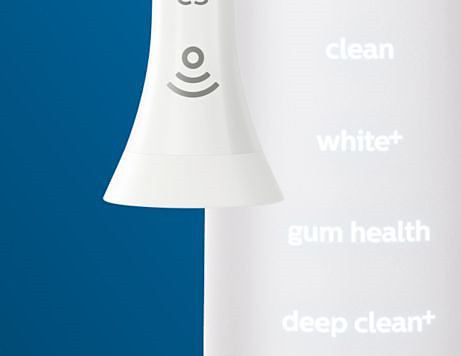
You can identify the Smart brush heads by the Smart icon at the base of the brush head as shown in the image below.
A microchip in the Philips Sonicare Smart brush head tells your DiamondClean Smart which brush head you are using. So if you click on a gum-care brush head, for example, your toothbrush knows to select the optimal mode and intensity for that brush head.
Breakthrough brush head design
BrushSync Microchip-enabled technology detects and synchronizes a smart brush head with a smart handle to optimize brushing performance
Mode pairing Automatically selects the optimal mode and intensity level for exceptional results
Replacement alerts Effectiveness is tracked based on brushing time and pressure, alerting patients when to replace a brush head on both the handle and app screen
Reminder bristles Blue reminder bristles fade to white within three months of normal use to help patients recognize when it’s time for a replacement
Click-on compatibility Brush heads are interchangeable for all click-on Philips Sonicare handles*
If you are wondering how to find out if your Philips OneBlade is fully charged, find out your answer here.
Charging indications for Philips OneBlade
Some Philips OneBlade models have a charging indicator on the front of the device.
When the OneBlade is running out of battery this indicator flashes orange.
When the OneBlade is charging, the indicator flashes green.
When the OneBlade is fully charged, the indicator lights up green continuously for approximately 30 minutes.
For other models, there is no indication of when the device is fully charged. However, when you plug it in, an orange light appears on the charger and stays on continuously while the charger is plugged in. To make sure these OneBlade models are completely charged, always charge them for at least 8 hours. Charging the OneBlade for longer periods of time does not damage its battery or machinery.
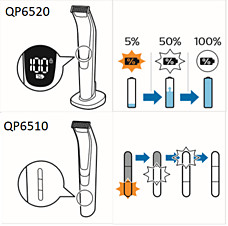
Charging indicators for OneBlade Pro
Based on the model of Philips OneBlade Pro you have, there can be two kinds of charging indications that you see. You can check the model number of your OneBlade printed on its backside.
QP6520 models
These models come with a digital display on the front of the device. When the battery is running out, the charging symbol blinks orange, and the remaining battery power is displayed on the device.
Once the battery is fully charged, the battery status percentage shows 100% and the charging symbol lights up continuously.
QP6510 models
These models show a battery status indicator bar on the front of the device.
When the OneBlade Pro is running out of battery the status indicator flashes orange.
When the OneBlade Pro is charging the first bar of the indicator flashes white and then lights up white continuously. Then the second bar flashes and and so on until the appliance is fully charged.
The indicator lights switch off automatically approximately 30 minutes after the OneBlade is fully charged.
If you have any further charging related questions, please refer to your user manual.
At the time of this writing, most of the medium and higher end Oral-B’s brush handles are all made in Germany. As for replacement brush heads, most of the models are all made in Germany, apart from EB20 Precision Clean, which are made in Ireland.
Note : For the lower end series like Vitality, DB4010/DB4510 and Children’s series DB4010K, D100, the whole product may now be made in China from oral-B’s factory there.
Product Packaging
Oral-B’s product will then be packaged differently for different markets, and the packaging box will generally be printed with local languages for individual market’s local buyer’s requirements.
E.g. For UK and US, they will be packaged with pure English descriptions on the box, but bundled with different accessories and Charger plug. For “US Edition” they will package with 110V, 2-pin flat plug, and for “UK Edition” they will package with 220 ~240V 2-pin round plug.
There are also packaging with multi-lingual packaging, “European Edition”, where French/Spanish/English/German description were printed on the Box.
Similarly, for China packaging, i.e “China Edition”, packaging is printed in both Chinese/English, for local market’s requirements, they will package with 220 ~240V 2-pin flat plug, for “China Edition”, and packaging for China market are generally more generous, usually with extra replacement brush heads, and usually coming with an original travel case for most models.
Are There any differences in Product?
Each of the Oral-B models listed on our product pages have very detail specs given, they differ by packaging box, color and type of handles, number and types of brush heads, and different accessories bundled with each package.
The lower end models like Vitality and DB40xx may have Made-In-Germany and Made-In-China version, but for all Oral-B higher end models (Pro 2000 and above), at the time of this writing, all brush handles are all made in Germany, which will then be packaged with Brush heads made in Germany/Ireland, and Charger / accessories made in China/Hungary/Mexico.
We do not think there are any difference in quality of products.
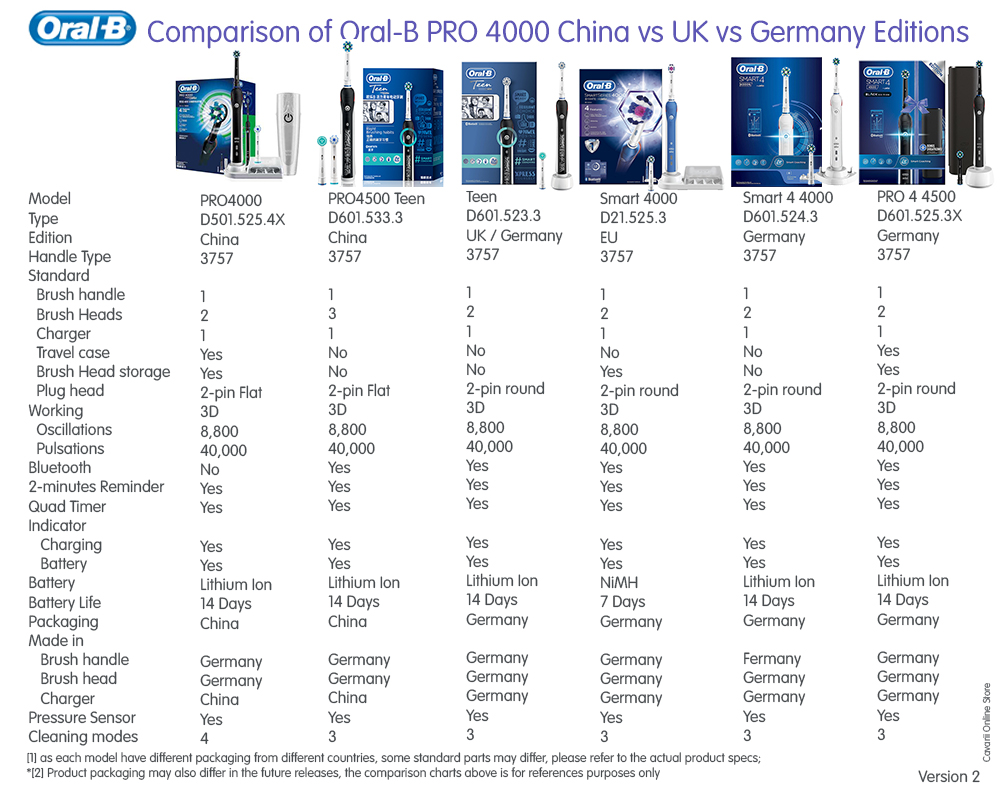
Here are some comparisons between Different Editions
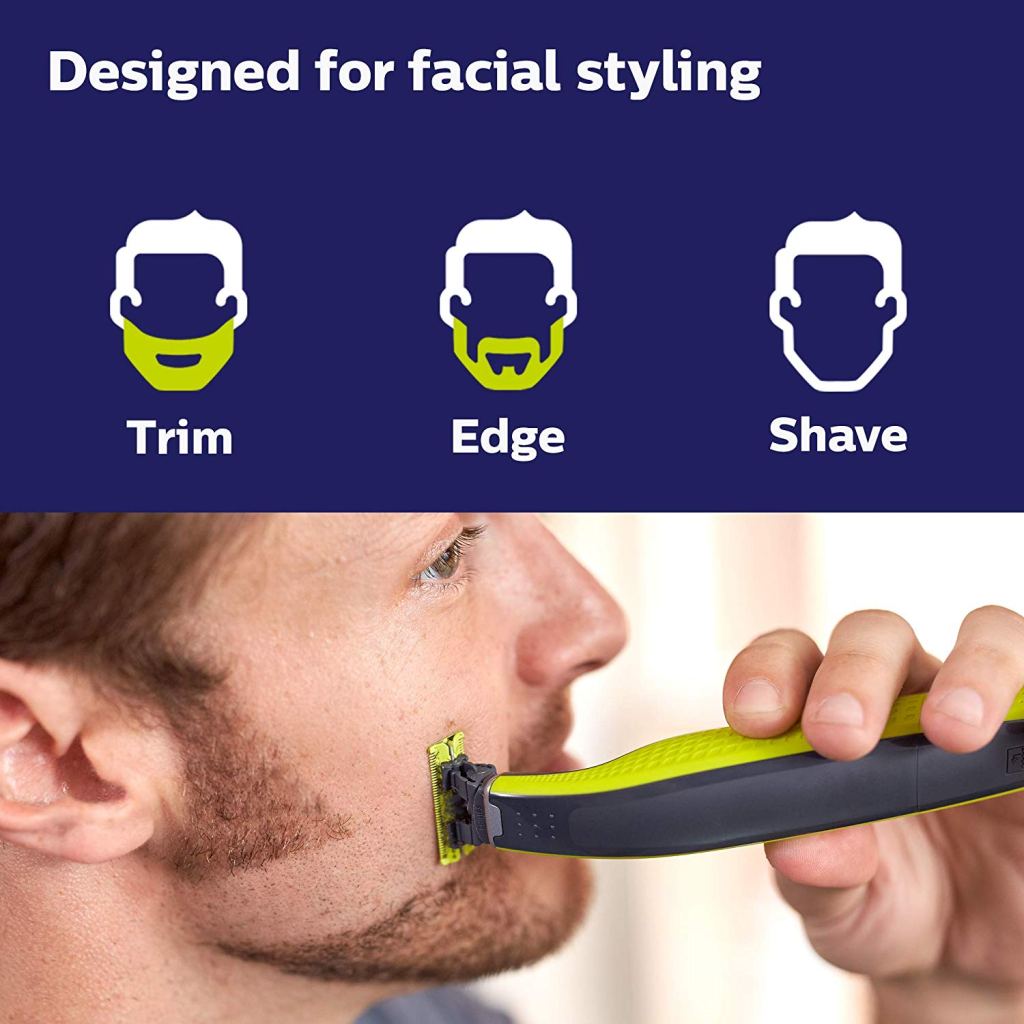
The Philips OneBlade is a revolutionary new hybrid styler that can trim, shave and create clean lines edges, on any length of hair. Forget about using multiple steps and tools. OneBlade does it all.
Not quite a beard trimmer, not quite a shaver, the OneBlade is an electric groomer designed for men who wear facial styles and beards. According to Philips, the device has been “specially designed to suit the modern man’s needs”. It can trim, edge, and shave any length of hair to a precision stubble length using one of the three combs that are included. Or, you can use it without a comb for a closer shave.
It’s in this latter use that the OneBlade actually excels. Although Philips says the device is aimed at those who maintain facial hair, I believe the OneBlade will be most appreciated by those who have long-suffered with razor-burn and ingrown hairs when using traditional shavers. The close shave achieved with the OneBlade is very good, and since it isn’t as close as you’d get with a wet razor blade, it means you’ll achieve a clean look with far less skin irritation, if any at all.
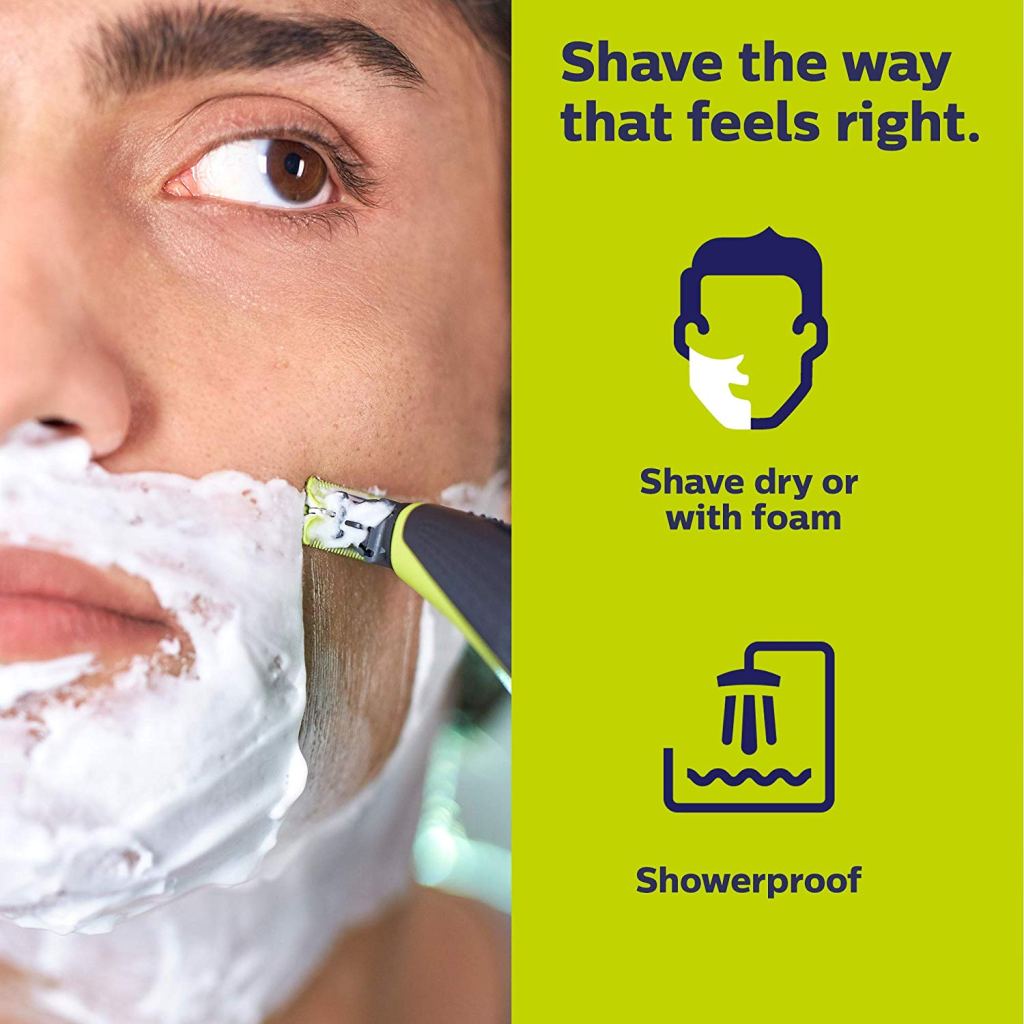
On the plus side, the OneBlade can be used both wet and dry. If you prefer to have your morning shave in the shower, or using shaving gel, the OneBlade will happily oblige. Plus, cleaning the device is simply a matter of running it under the tap.
The OneBlade Blade Design
Although Philips says the OneBlade uses a combination of rotary technology and a trimmer, this is neither a foil or rotary shaver. Basically, the head uses a single blade, which is a refreshing move in an industry that seems to think adding as many blades as possible is the definition of innovation.
This single blade moves incredibly quickly – 200x per second, in fact. It’s surrounded by a “dual protection system”, meaning it’s guarded by a shield with rounded plastic tips to protect your skin. Quite where the rotary part comes in remain unsure, but it’s certainly a nice and simple design. Also helpful is the fact the head pivots, offering greater control when tackling the more difficult areas of your face.
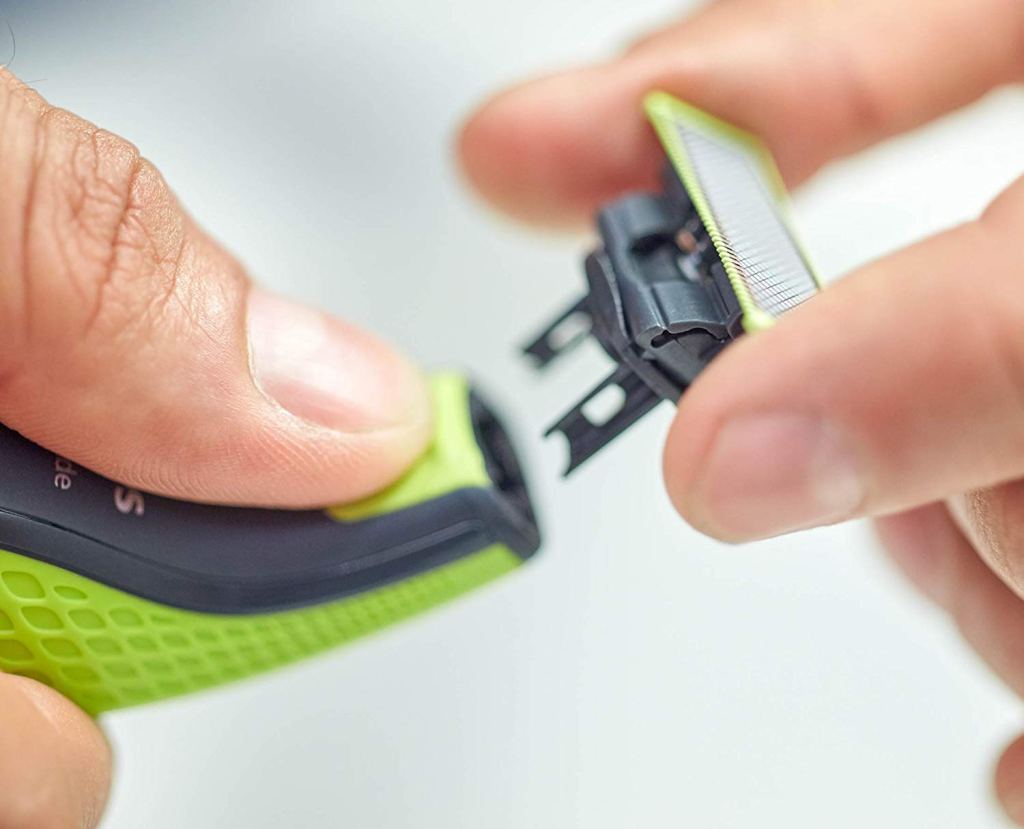
Changing the head takes only seconds using the aforementioned “eject” button to remove the old one. Philips recommends changing heads every four months. On the whole, the OneBlade is well designed and therefore a pleasure to use.
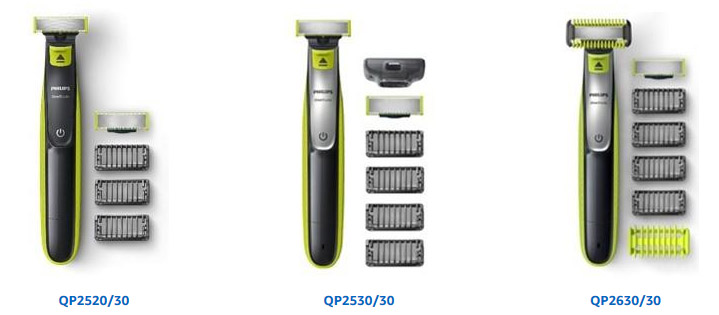
OneBlade QP2520, QP2530, QP2630
These series comes with a single blade handle, and various bundling of blades, combs of different lengths, face or body guards.
They also comes with different rechargeable batteries, either Ni-MH or Li-ion, which give different battery usage and charging times (refer to the comparison chart below).
The OneBlade has a power button and eject slider to remove the head, and a charging port on the bottom of the handle.
OneBlade Pro
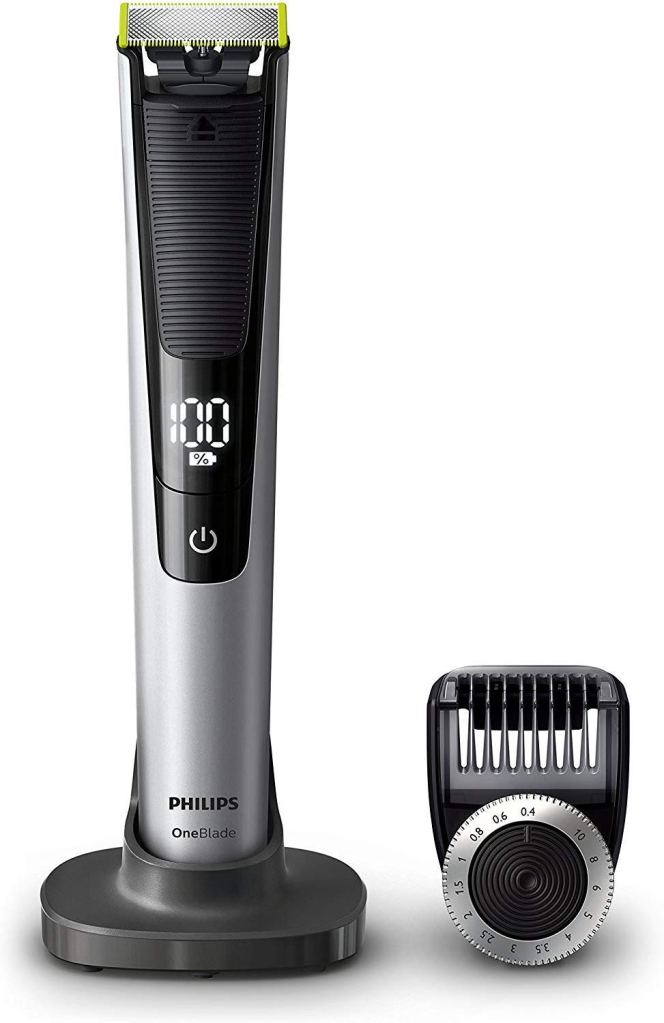
If you’re after a more refined shaver then there are also a “Pro” version in the OneBlade range. It sports a more sophisticated black design. The Pro shaver comes with an adjustable precision comb that has 14 length settings from 0.4 to – 10mm, instead of the various “combs” that comes with the “non-Pro” version
It also comes with an LED display that shows the battery level of the OneBlade handle.
The Pro model comes with a charging stand instead of the mobile charger as in the other models.
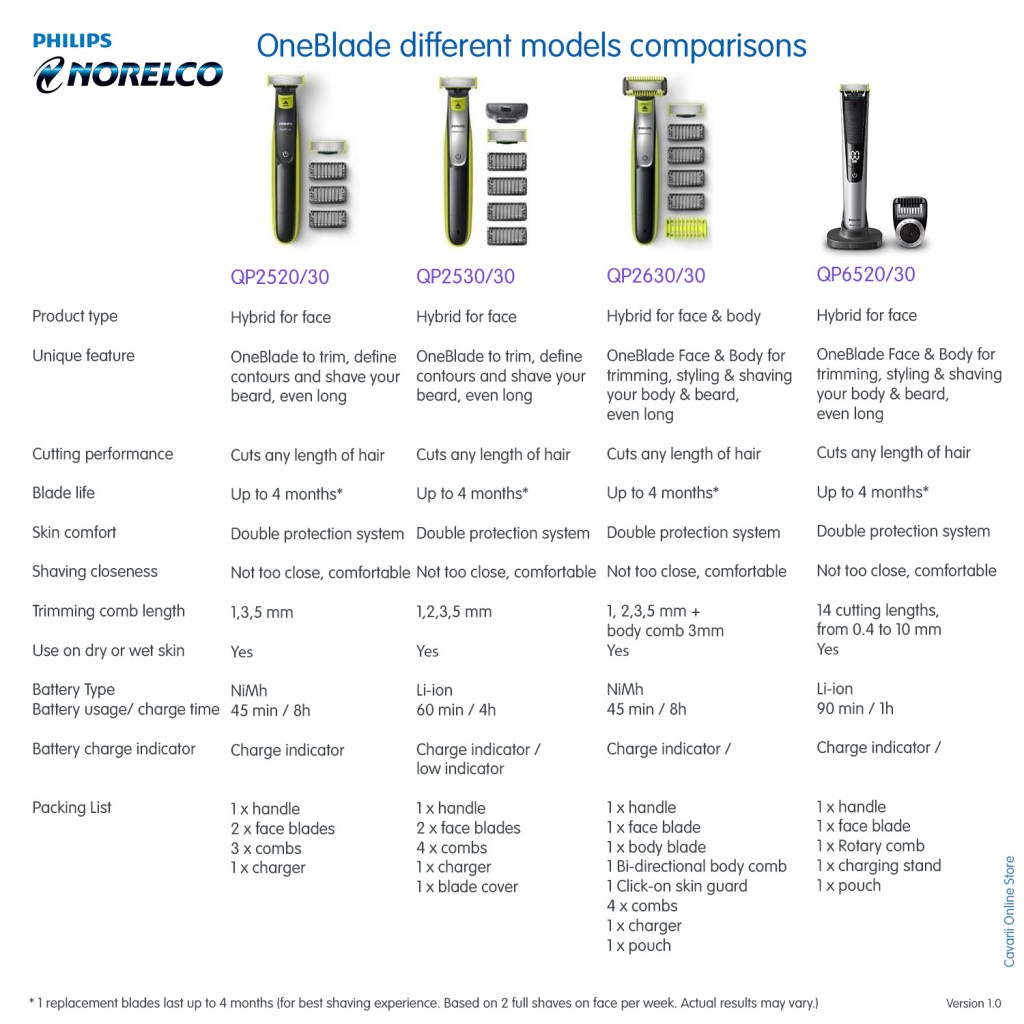
Comparisons
The following chart give comparisons on features and parts for the various models
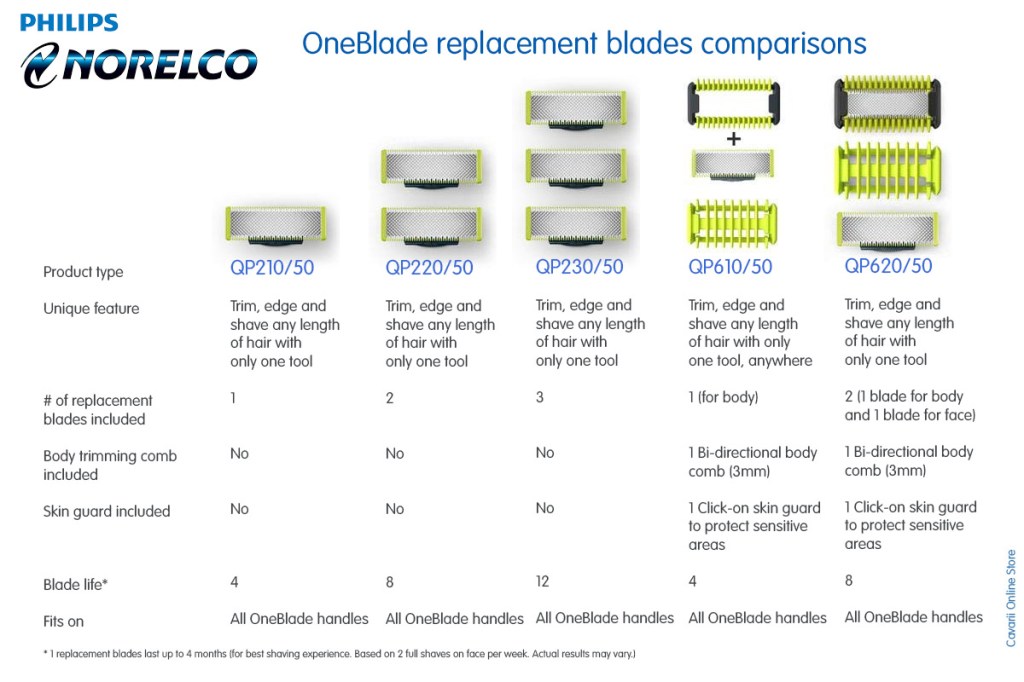
The OneBlade Replacement blades
Apart from the main OneBlade package, you can also place order for the replacement blades, which also come in variety, depending on your needs.
The following chart give the comparison of various packages for replacement blades
If you do not keep your electric toothbrush clean and wipe off dry after every use, for some reason, they develop a weird coating of grey-brown slime around the base over time. But what is this goop? Is the toothbrush secreting it? Is it possessed?? How do you make it stop?
The accumulated water and protein-laden water drips down around the base of the handle and there are enough nutrients in that water to allow bacteria and mold to grow.
If you’re gagging at the thought of your electric toothbrush being covered in mold, you’ll probably want a few tips on how to stop stuff like this from happening. As per Debra Johnson of Merry Maids: “For starters, I recommend thoroughly rinsing with warm water every two to three days to remove excess toothpaste and germs from the exterior. You’ll also definitely need to give it a deep cleaning, preferably once per week or every other week.”
How to Deep Clean Your Electric Toothbrush
First, Johnson recommends soaking the toothbrush head for 30 minutes in this DIY sanitizer:
“Mix a half cup of water, two tablespoons of white vinegar and two tablespoons of baking soda in a large bowl (make sure it’s big enough to accommodate the bubbling that results from mixing vinegar and baking soda).”
While the toothbrush head is soaking, wipe down the handle with a mild cleanser or bleach solution to remove excess gunk (use a cotton swab-dipped solution to clean out the area where the head is attached).
When 30 minutes have passed, rinse both the toothbrush head and handle with warm water.
Admittedly, this all seems like a lot of effort to go to. In the end, you’ll just have to decide what’s the lesser of two evils: Biweekly baking soda rinses, or sticking a gunk-covered germ factory in your mouth twice a day. See you in the baking soda aisle, we guess.








 Cavarii Online Store