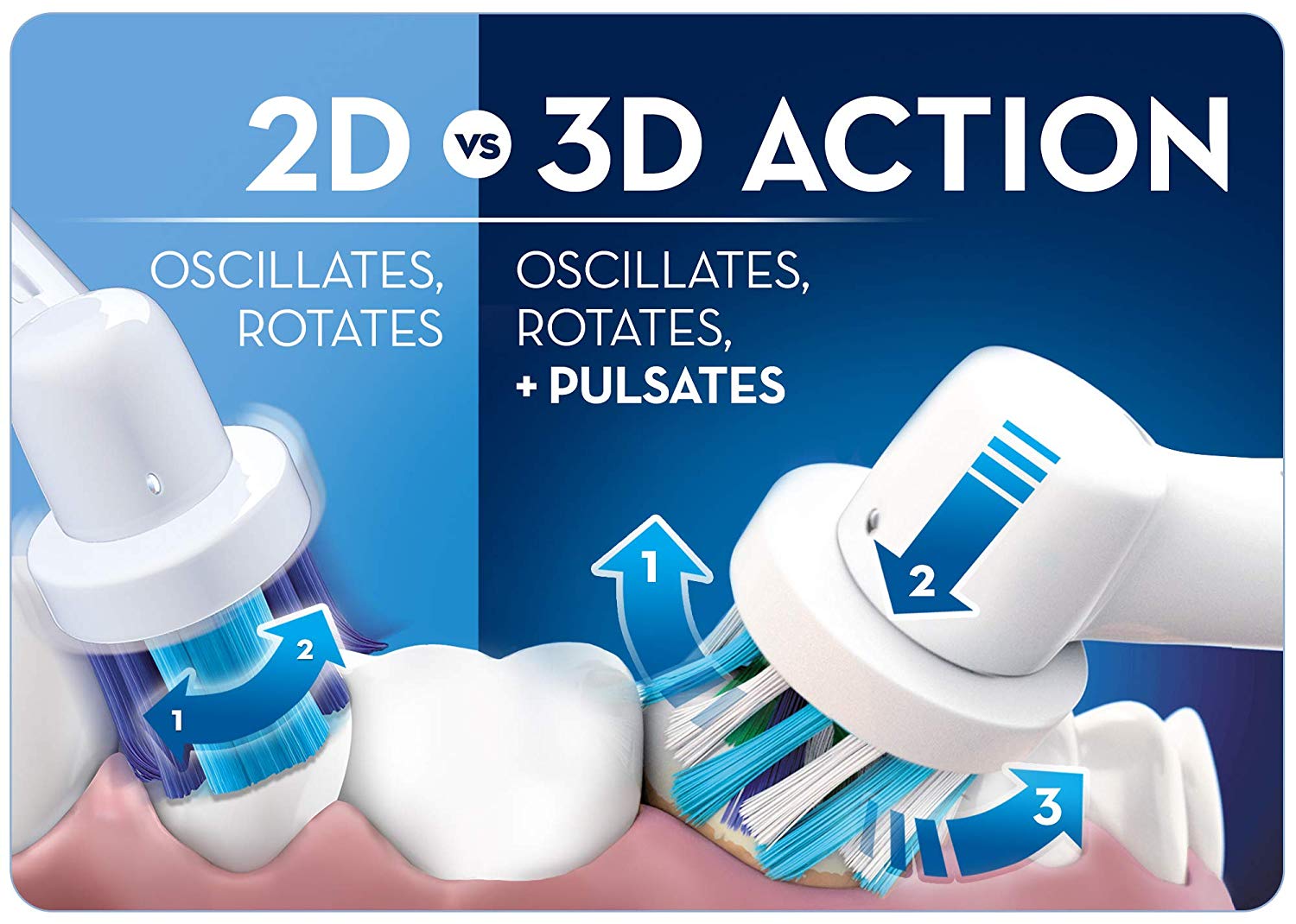
The 3D action on Oral-B electric toothbrushes means that they oscillate, rotate and pulsate to give you the best possible cleaning, removing up to 300% more plaque along the gum line than a regular toothbrush. It works by pulsating to break up the plaque, and then oscillating and rotating to sweep the plaque away.
The Oral-B Vitality and DB40x0 series use a slightly inferior 2D oscillating rotating mechanism of action. This means that it only oscillates and rotates instead of oscillating, rotating and pulsating. The 2D mechanism of action will clean your teeth better than a regular manual toothbrush however not as well as the 3D.
What is the difference between Oral-B Pro 600, Pro 600 Plus, and Pro 700 electric toothbrushes?
Both Oral B Pro 600, Pro 600 plus and Pro 700 Oral B electric toothbrushes provide a clinically proven superior clean vs. a regular manual toothbrush.
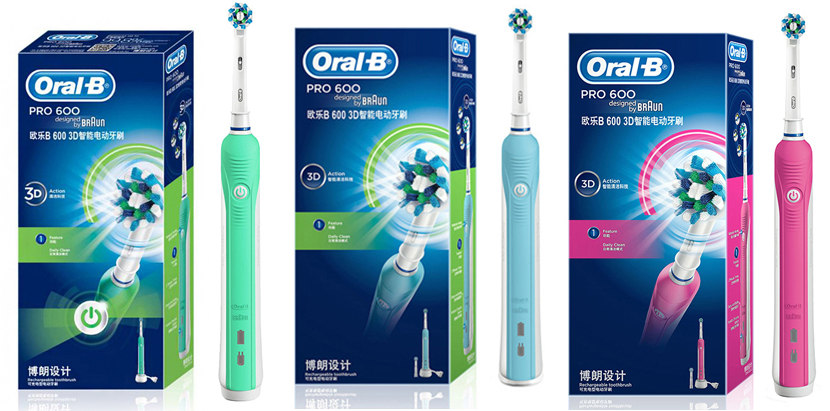
As Oral-B have different packaging for different countries, some times the same product maybe market as a different model number. For example the same Pro600 in France or US, maybe marketed as Pro600 Plus in China
What you need to do is to compare the features of each model, as all replacement brush heads are common use among all models.
Here’s a summary of their main features to help you decide which one is the best for you!
Oral-B Pro 600:
1 Cleaning mode: Daily clean
Charging and battery level Indicator
3D Cleaning Action oscillates, rotates and pulsates to break up and remove more plaque than a regular manual toothbrush
In-handle timer helps you brush for a dentist-recommended 2 minutes
1 or 2 brush heads depending on color of handles and packaging
Oral-B Pro 600 Plus:
Pro 600 Plus have 2 colors
1 Cleaning mode: Daily clean
Charging Indicator only
3D Cleaning Action oscillates, rotates and pulsates to break up and remove more plaque than a regular manual toothbrush
In-handle timer helps you brush for a dentist-recommended 2 minutes
1 or 2 brush heads depending on color of handles and packaging
Oral-B Pro 700:
Pro 700 is similar to Pro 600, there’s no noticeably any difference in features.
1 Cleaning mode: Daily clean
Charging and battery level Indicator
3D Cleaning Action oscillates, rotates and pulsates to break up and remove more plaque than a regular manual toothbrush
In-handle timer helps you brush for a dentist-recommended 2 minutes
1 brush head
Variants of Pro 600
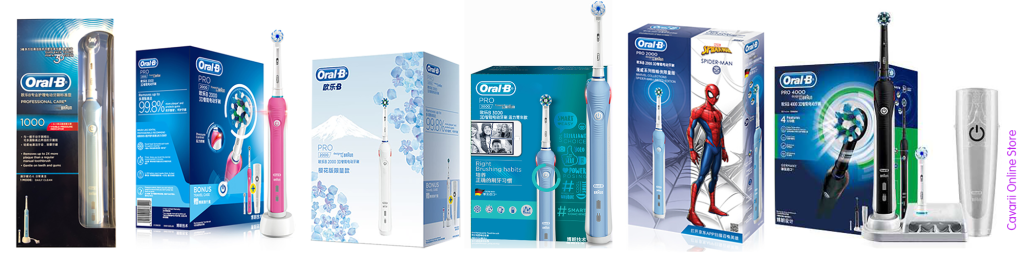
As shown in the photo above, Pro 600 comes in different packaging in different countries, the above is similar to the Pro600 Plus packaging in China, all with the same brush handle, but with different brush head bundled.
At the end of the day, you can just order different replacement brush heads after the original brush head had worn out.
Once your handle is fully charged, continue using your electric toothbrush until no charge is left, or when the battery level indicator starts flashing. Then, fully charge it again instead of charging between each use. This will help your battery perform at its best longer.
It will depends on the model of your Oral-B and the type of rechargeable battery it use for the brush handle. Once the red charge light appears the battery capacity may last 1 or 2 cycles, but this depends on user behavior, age of battery and various other factors related to the product
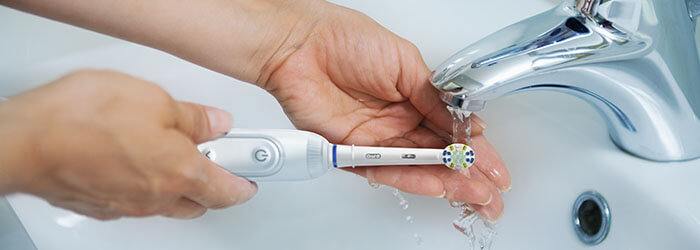
Note – While the toothbrush handle can be washed all over and rinse with water, but the bottom of the toothbrush handle should be dried before charging.
For Vitality series of toothbrush handle, since there is no charging or battery indicator light, the best way to check whether the Oral-B Vitality brush is charging is to pick the toothbrush up off the charger after 30 minutes and switch it on. If it comes to life, you know it’s charging. Switch it back off and leave it on the charging stand for the full 16 hours it needs to complete a full charge. Please read the original post on official Oral-B site here
How to Clean Your Electric Toothbrush
It’s important to take care of your electric toothbrush to make sure you get your best clean with every brush. Here are some tips on how to clean and take care of your electric toothbrush to keep your smile at its healthiest.
Because one of the main purposes of a toothbrush is to remove bacteria from your mouth, it’s important to keep your toothbrush sanitary and free of bacteria.
Keep these tips in mind to keep your electric toothbrush clean and safe:
Keep it covered on the road, but not at home. When you travel, put your toothbrush in a toothbrush travel case, don’t let it roll around uncovered in your suitcase or toiletry bag where it can pick up dust, dirt, and bacteria. But don’t store a toothbrush in a toothbrush travel case at home-the chronically moist environment can promote bacteria growth. If you must use a covered toothbrush holder frequently, look for one with small holes to let air in.
When at home, store your toothbrush upright in a cup or a toothbrush holder that allows it to air dry and has several openings to keep multiple toothbrushes separate.
Consider a sanitizer. There are commercially available “toothbrush sanitizers,” but there’s no solid evidence to suggest that they actually keep toothbrushes cleaner than simply rinsing them with water after use and allowing them to dry. If you want to try a sanitizer, look for one that has been approved by the Food and Drug Administration for “reducing bacterial contamination that occurs naturally on toothbrushes.” Be suspicious of sanitizing products that make unrealistic claims. And never try to clean your toothbrush by putting it in the dishwasher or microwave; the high temperatures can damage the brush.
Electric Toothbrush Storage and Maintenance
In addition to the tips above, you should rinse your electric toothbrush every day with tap water after use to remove toothpaste and debris.
Don’t over-brush. Putting too much pressure on your toothbrush can cause the bristles to wear out more quickly and be less effective when cleaning.
Store your toothbrush in an upright position to let it air-dry.
Replacing the brush heads
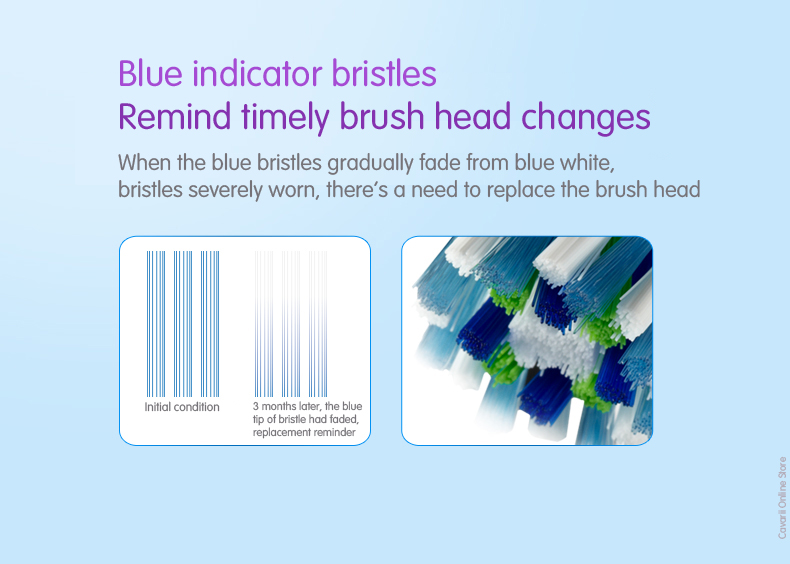
Replace your Oral-B® Electric Toothbrush brush head every three months, or when the blue Indicator® bristles fade halfway to white, or earlier if you notice fraying. Simply pull the old brush head off your handle at a straight angle, and snap on a new brush head in the same manner.
If you’d like to buy replacement chargers, handles, travel cases or other accessories for your Oral-B Electric Toothbrush, visit our online store
We wouldn’t be at all surprised if you were confused by the different cleaning modes that the Oral-B toothbrush may offer. Some toothbrushes have just 1 mode, others 2, whilst some have as many as 6 modes. What do all these different modes do and why might you need them?
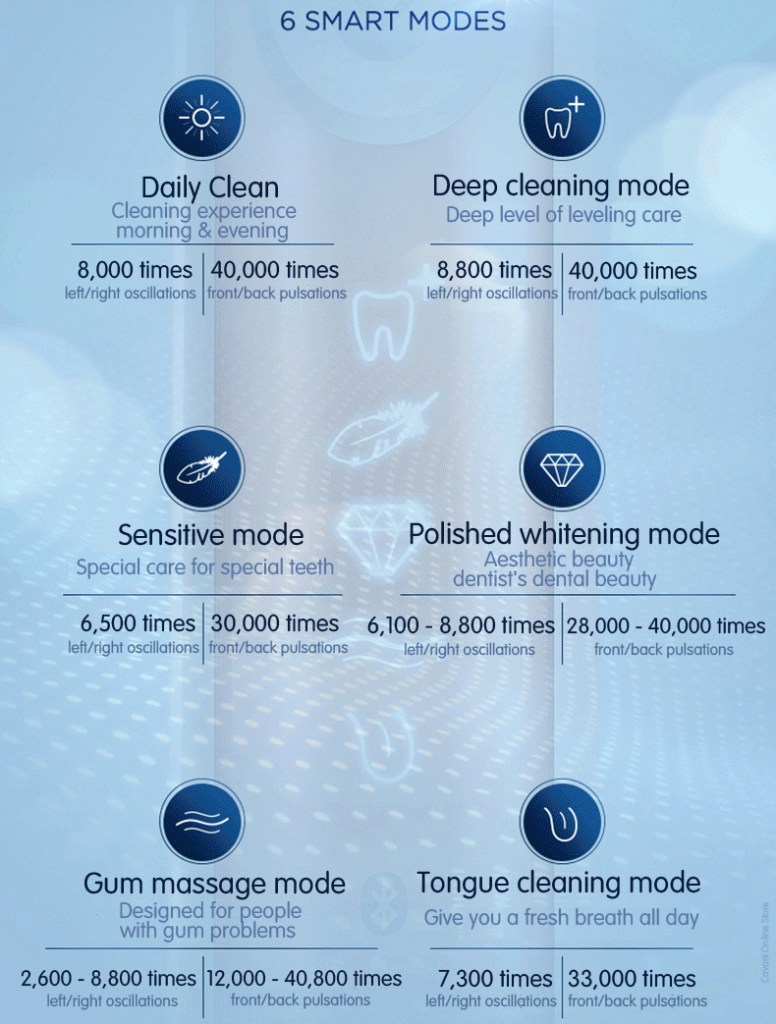
Each Oral B toothbrush has at least one brushing mode, Daily clean. Many of them have multiple brushing modes. There are 6 modes available across the devices. There’s Daily Clean, which is commonly used daily. The Gum Care massage mode. That’s used to stimulate the gums. The Sensitive mode is a lowered power for those with sensitive gums and teeth.
There’s a Whitening mode that shines and brightens your teeth. The Pro-Clean was previously known as Deep Clean. It removes more plaque and film from your teeth. Lastly, there’s Tongue Cleaner. This is used to remove food and bacteria that’s hiding on the surface of your tongue.
This is the standard mode for daily teeth cleaning.
The cleaning cycle lasts for 2 minutes; 30 seconds for each quadrant.
Those brushes with a timer and Quadpacer built in give an audible tone, via a pause in the brushing motion at 30 second intervals and then at the end of the 2 minute cycle.
Up to 10,500 oscillations and up to 48,000 pulsations (subject to model – see power delivery)
The Cross Action, Floss Action, TriZone or Precision Clean brush heads are suitable for this cleaning mode.
Gum Care (Also known as Massage)
Suitable for those with sore or inflamed and even bleeding gums. It offers a gentle massage of gums to stimulate blood flow and strengthen and nurture the gum tissue.
The cleaning cycle lasts for 2 minutes; 30 seconds for each quadrant.
Those brushes with a timer and Quadpacer built will give an audible tone, via a pause in the brushing motion at 30 second intervals and then at the end of the 2 minute cycle.
2,600-10,500 oscillations and 12,000-48,000 pulsations (subject to model – see power delivery).
The Cross Action, Floss Action, TriZone or Precision Clean brush heads are suitable for this cleaning mode.
Sensitive
A gentle yet thorough cleaning for sensitive areas of the mouth, this mode is also recommended by some dentists as a better option than the Daily Clean as it is not so powerful.
The cleaning cycle lasts for 2 minutes; 30 seconds for each quadrant.
Those brushes with a with a timer and Quadpacer built in which will give an audible tone, via a pause in the brushing motion at 30 second intervals and then at the end of the 2 minute cycle.
6,500 oscillations and 33,000 pulsations.
The Sensitive brush head is most suitable for this cleaning mode.
Whitening
Aims to polish teeth to give that dentist clean look and feel for brighter teeth.
Suitable as an occasional or everyday cleaning mode.
The cleaning cycle lasts for 2 minutes and 20 seconds normally.
The first 2 minutes are for completing the normal cleaning and the additional 20 seconds for focusing on the front teeth.
Those brushes with a with a timer and quadpacer built in which will give an audible tone, via a pause in the brushing motion at 30 second intervals and then at the end of the 2 minute and 20 second cycle.
6,100-10,500 oscillations and 28,000-48,000 pulsations (subject to model – see power delivery).
The 3D White brush head is most suitable for this cleaning mode.
Pro Clean (Previously Deep Clean)
This is cleaning mode is the same as the Daily Clean but pre-programmed to last for longer.
The cleaning cycle lasts for 3 minutes; 45 seconds for each quadrant compared to the standard 2 minute clean and 30 second intervals.
Each Pro series brush has a timer built in which will give an audible tone via a pause in the brushing at 45 second intervals and then at the end of the 3 minute cycle.
8,800 – 10,500 oscillations and up to 48,000 pulsations (subject to model – see power delivery).
The Cross Action, Floss Action, TriZone or Precision Clean brush heads are suitable for this cleaning mode.
Tongue Cleaning mode
Used for cleaning the tongue or inside of the cheeks.
More gentle than a conventional cleaning mode.
Suitable for daily or occasional use.
The cleaning lasts for 20 seconds.
7,300 oscillations and 33,000 pulsations
The Sensitive brush head is advisable for this mode.
This hopefully helps explains what each modes means and how exactly the brushing modes differ.
The following table helps compare the modes a little further and also lists, which models offer which brushing mode.
Daily Clean – the standard daily mouth cleaning mode lasting for two minutes divided into 30 second quadrants for each section of the mouth.
Sensitive – gentle yet thorough cleaning mode that combined with the sensitive brush head works to remove bacteria and plaque from sensitive areas of the mouth. The sensitive mode is less powerful than daily clean mode and oscillates 6,500 times and 30,000 pulsations per minute. I have very sensitive teeth and gums so this has become my go-to mode of choice.
Whitening – a two minute cycle designed to polish the teeth with the unique brush head featuring a polishing cup in the middle of the brush.
Gum Care – a lower speed mode that aimed at caring for the gums and will pulsate from 2,600 to 8,800 oscillations and 12,000 to 40,000 pulsations.
Tongue Cleaning – ideal for cleaning the tongue and inside of the cheeks and the tongue cleaning mode lasts for 20 seconds oscillates 7,300 times and pulsates 33,000 times per minute.
Deep Clean – this is a three minute mode with 45 second quadrants to offer a more intense clean and oscillates 8,800 times and 40,000 times per minute.
The following are the most Frequently Asked Questions for Oral-B electric toothbrushes
How long does it take to charge my Oral-B and how long does it last?
It will depends on the model of your Oral-B and the type of rechargeable battery it use for the brush handle. Once the red charge light appears the battery capacity may last 1 or 2 cycles, but this depends on user behavior, age of battery and various other factors related to the product
How do I know if my Oral-B Vitality toothbrush is charging?
As Vitality is the entry level of Oral-B electric toothbrush, the only Oral-B electric toothbrush that do not have an indicator light to let you know and only one button for both the on/off position, sometimes it can be tricky.
The best way to check whether the Oral-B Vitality brush is charging is to pick the toothbrush up off the charger after 30 minutes and switch it on. If it comes to life, you know it’s charging. Switch it back off and leave it on the charging stand for the full 16 hours it needs to complete a full charge.
Please read the original post on official Oral-B site here
Do you need to charge the Toothbrush every night? No the toothbrush holds a charge for a few days to 2weeks depending on models. It had very sufficient battery life. Charge once a week is good as you brush your teeth for 2 minutes a time, 2 times a day and the charge will lasts at least a week (depending on model).
Could I just buy one toothbrush for my family and have each person switch to their own brush head each time they brush? Yes, especially if you have a brush head storage that holds up to four brush heads. You would need to charge it more often though. However, while it may work perfectly for 2 person, with the whole family it might be hard since you may not always be at home where it is always convenient.
Do you need to charge the Toothbrush every night?
Could I just buy one toothbrush for my family and have each person switch to their own brush head each time they brush? Yes, you can do that. But remember to mark and identify each person’s brush head, as there are hygiene involved if you accidentally share brush heads. Take note that unless you all share the same bathroom, otherwise it would be very inconvenient. Usually sharing are for couple stay and share the same bathroom.
Also please take note, if you are sharing, the battery may not last as long as you want, as sharing by 2 person will halve the battery lasting time per charge.
The 2 minutes reminder Dentist recommended brushing teeth for maximum of 2 minutes, for electric toothbrush that have the 2-minutes reminder build-in, once the 2 minutes are up, the brush head will vibrate 3 times to let you know that your recommended two minutes of brushing is up.
Can I replace the battery in my Oral-B electric toothbrush? No, you cannot replace the battery in your Oral-B electric toothbrush. The battery is contained within the electronics of the toothbrush handle and the unit is then sealed to keep it water tight. For these reasons we do not provide replacement batteries for Oral-B electric toothbrushes. Please Note: There are some third party guides out there, some even with Youtube videos, on showing you how replace the rechargeable on your own, please be reminded that this will be done at your own risk, as improper replacement may leads to electrical shocks.
Why the Charger plug all comes in 2-pin? So you have just bought that new electric toothbrush, but wait, how do you charge it? It has a 2 pin plug on it, rather than 3 pin plug you are used to here in your country. This 2 pin plug, is a shaver plug. It is designed to fit into the shaver socket found in many bathrooms in UK/US/EU.
Safety is the reason it comes with a 2 pin shaver plug, rather than a 3 pin.
In the UK or countries using the UK 3-pin plug, the mains electricity that you connect your appliances and gadgets into works on 240 volts. This is a high voltage and can cause serious injury and death if you were to touch a live electrical line.
Under most circumstances if you include water and electricity the effects of injury are much greater as water reduces the resistance the human body has to the electrical current.
Therefore to protect people, a ‘safer’ less powerful form of electrical socket was introduced into bathrooms, where water is generally present more frequently.
This safer solution was and is the 2 pin socket, similar to the 2 pin SCHUKO connector found in many European countries.
This meant that more traditional power hungry products could now not easily be used within these rooms, only lower power items, therefore reducing the chances of injury.
Yes you will need a 2 pin to 3 pin plug adaptor also known as a shaving adaptor. This is the same with all Oral-B electric toothbrushes.
What is the difference between so many models of PRO600?
The Oral-B of the same model come in different packaging and names, however, they are all actually the same unit in terms of power and technicality. The difference between them is the brush head which comes in the box (eg. CrossAction 600 will have a CrossAction toothbrush head), and the color of the toothbrush handle.
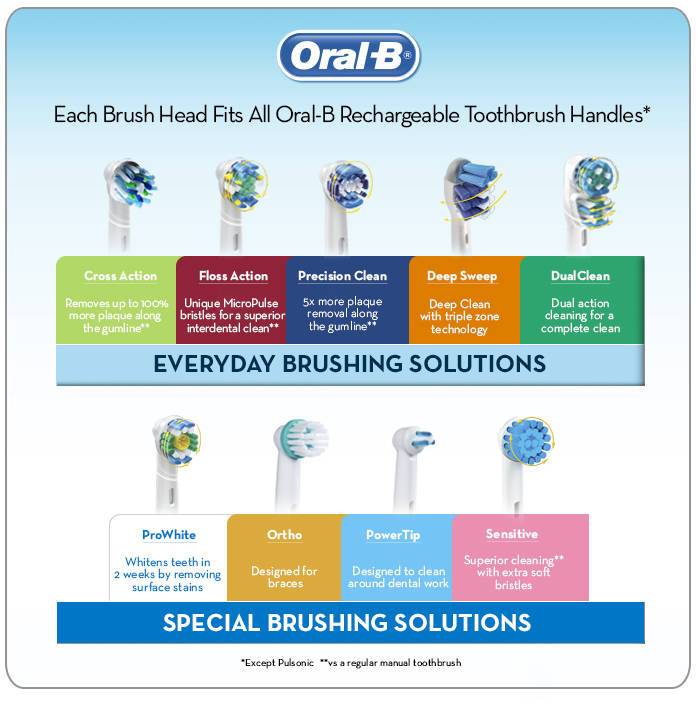
The following EB series of replacement brush heads are compatible for all the
Battery powered DB4010, DB4510 brush handle
D100 Series
Vitality Series
PRO, Pro 2, Pro 3, Pro 4
Smart Series 4000, 5000, 6000, 7000
iBrush Series
Genius Series
of Oral-B electric toothbrushes
You can go through the following Youtube playlist to view the functions of all the different types of replacement brush heads, you can select the individual 15 videos to show each brush heads’ characteristics.
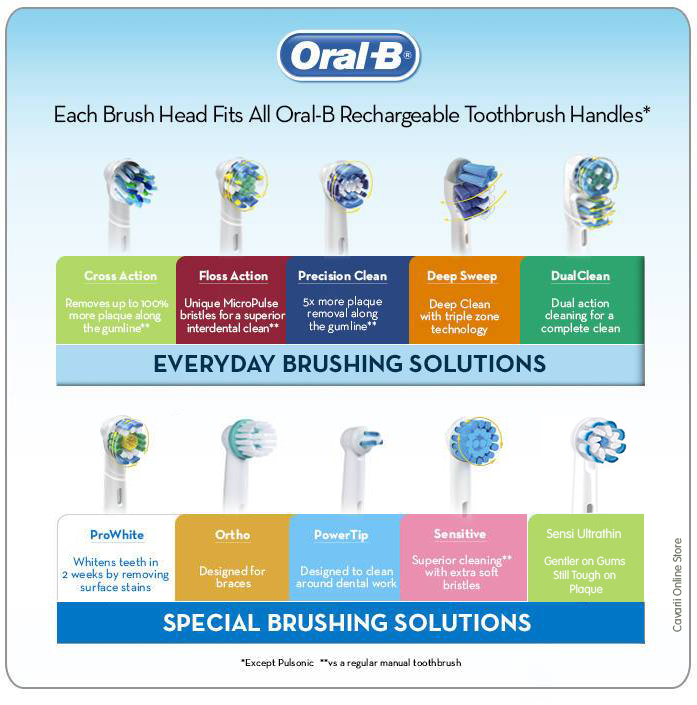
Here’s a quick overview of Oral-B’s latest roster of brush heads:
EB10 Precision Clean
Precision Clean: Best For Beginners
Here’s a comfortable clean that works best for beginners. It’s a balanced brush head that gently eases first-time users into the routine with rounded bristle tips grouped into several small clusters to maximize the area covered. Its bristles are trimmed in the shape of an arc which helps the bristles wash over the tooth completely.
Capable of removing up to 5x more plaque than a manual toothbrush the precision clean head leaves your whole mouth feeling cleaner thanks to an arc trim that cups each tooth as you brush it.
EB50 CrossAction
Cross-Action: A Well-Rounded Clean
This is the brand’s standard brush head. It’s designed to give a well-rounded clean. The brush head has a polishing cup in the middle to remove surface stains. The CrossAction toothbrush head has a CrossCross bristle configuration set at a 16 degree angle to effectively clean teeth, along the gumline and reach deep in between teeth to loosen and remove up to 100% more plaque than a manual toothbrush.
The bristles are bunched into 26 smaller clusters. Right in the centre you have 2 clusters of short white bristles. Around this is a ring of 8 bristle clusters that are a dark blue and green in colour.
The green bristles are the same height as the inner white bristles and the dark blue sit slightly taller. All of these bristles are angled at 16 degrees. There is then the final outer ring of bristles. 16 clusters all of which are angled at 16 degrees. There are shorter white bristles and then taller light lue bristles. It is the light lue bristles that are the ‘indicator bristles that fade over time as the brush head is used.
Oral-B also have a black color version of the CrossAction brush head, the only EB series in Black color
EB60 Sensi UltraThin
Sensi Ultra-Thin: Good Cleaning For Fragile Teeth
The Sensi Ultra-Thin can churn out as much power as its fellow brush heads. However, it is designed differently. It has a round head with soft, thin bristles that are rounded at the tip. This ensures that the bristles can still provide a good cleaning without being too abrasive for fragile teeth.
Engineered to be softer on the teeth and gums, the bristles are softer and formed into a petal shapes for a more gentle movement along the gumline, tooth surface, in and around sensitive and inflamed areas
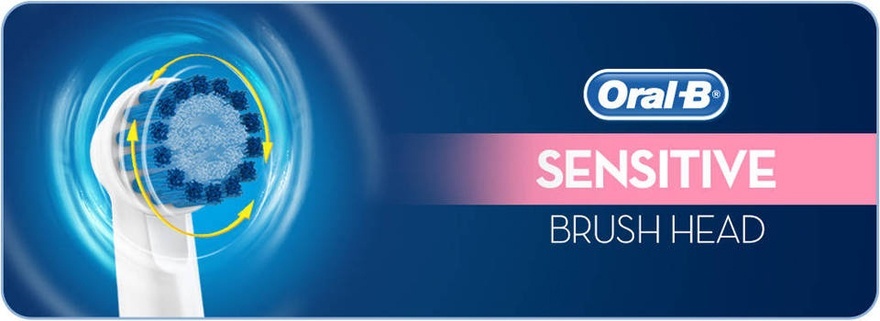
EB17S Sensitive
Sensitive Clean: Extra Soft Bristles For Sensitive Gums
This is an older version of the Sensi Ultra-Thin. It has extra soft bristles and is a particularly popular option for users with sensitive gums.
EB25 Floss Action
Floss Action: Brush AND Floss Between Each Tooth
This is built to simultaneously brush and floss between each tooth. As a result, the bristles have a slightly wiry look and feel to them. This brush head is best for those who put healthy gums as a priority.
The unique MicroPulse bristles are designed to reach and clean deep between the teeth to give a floss like clean whilst other bristles focus on the tooth surfaces and the gum line to help lift and remove plaque.
EB30 Trizone
Trizone (or Deep Sweep in the US) : Three Different Cleaning Zones
This is one of the newer brush heads with three different cleaning zones for maximum effect. Since it is designed specifically to provide a deep and comprehensive clean, it may not be the best brush head for people with sensitive teeth.
It looks like the manual toothbrush head and have interchangeable head features 3 bristle zones.
A power tip reaches the back teeth whilst shorter bristles clean the tooth surface and longer sweeping bristles that reach up to 2X deeper between teeth compared to a manual brush to deliver a more superior clean.
It is also worth noting that the TriZone brush head is larger than
the oscillating rotating brush heads like Cross Action, Floss Action
etc.
EB18P 3D White
3D White (or Pro-White in the US)
This is designed for advanced cleaning to help you achieve a whiter smile. Offering a specially designed, dentist inspired polishing cup this brush head is for a tooth by tooth clean that works to remove surface stains to whiten teeth while the bristles clean away plaque.
In fact, 3D White has the power to whiten teeth in 2 weeks by removing surface stains.
EB417 Dual Clean
Dual Clean:
This has two moving brush heads in one for twice the cleaning action. It is designed to provide gum care and remove plaque.
One bristle section moves side to side while the other oscillates and pulsates for twice the cleaning action. It can even penetrate hard-to-reach areas.
IP17 Interspace (or Power Tip)
Power Tip (or Interspace in the US):
This is for cleaning around Dental Work and is specially designed to clean around bridges, crowns, and other dental work. It cleans between teeth in tiny, hard-to-reach areas.
Referred to as either Power Tip or Interspace this brush head is specifically designed to clean between teeth and around dental work such as bridges, crowns and tiny, hard to reach areas in between teeth and implants.
OD17 Ortho
Ortho: For braces
Designed to suit those who are undergoing orthodontic treatment the brush head makes for easier and simpler cleaning of braces.
Inner bristles focus on the brace attachment to the tooth whilst outer bristles focus on the exposed tooth surface, the gumline and in between teeth. An ortho brush kit often contains 2 other brush heads and a Interspace/Power Tip.
How Soon should you replace your brush head?
The recommended time period for changing an Oral-B brush head is every 3 months.
This is a general consensus among the dentistry profession. You will
find that the brush heads will normally last 3 months and whilst the
intensity of the bristle colour may have changed the bristle formation
should still be virtually the same as it was when new at the end of the 3
month period.
Using a brush head for longer can actually cause harm to the teeth
because bristles can become damaged and less effective at how they sweep
across the tooth surfaces, in between teeth and along the gum line.
Therefore it is always important to monitor your brush head and
consider whether it is necessary to change your brush head sooner rather
than later.
Choosing a particular electric toothbrush model from the Oral-B line up can be a bit confusing. We break down all the technology that Oral B has to offer its customers. You’ll be able to read about all the features and benefits. After reading all about Oral-B, and everything they offer, you’ll be making a more informed choice.
Oral-B electric toothbrushes have advanced brushing technology like their various cleaning modes. They have so many great features in each of their toothbrushes. They deliver stronger teeth, healthier gums, and less plaque.
Note – If you are looking for Children (3+ through 6 years old), Junior (6+ through 12 years old) or Teen series, please refer to – Oral-B Children and Junior Series.
New to Electric Toothbrush or looking for an upgrade model?
For users who have not use an Oral-B electric toothbrush before, or users who had used an entry level model, and would like to upgrade to a higher end model, we hope this guide would give some comprehensive guide to the range of Oral-B products that we have in our store.
We hope this guide gives thorough, yet concise explanations of all the features and functions available on Oral-B electric toothbrushes today. This guide will help you understand which one meets your needs and budget, and comes with all those specifications described by Oral-B.
How to choose an electric toothbrush really comes down to one factor: likability. The best toothbrush for you is the one you’re most likely to use. If you like your toothbrush, you’re more likely to brush for the full, recommended time of two minutes and clean all the tooth surfaces as dental professionals recommend.
Although price is always a consideration, your oral health depends on it. Factor in your overall oral health, lifestyle and budget, as well as features that you want, to decide the model that you need.
Understanding Oral-B’s Model series
Oral-B produced a very wide range of electric toothbrush, from budget electric toothbrushes to high end premium electric toothbrushes. There are 2 main categories of Oral-B
a) Battery Operated Electric Toothbrush
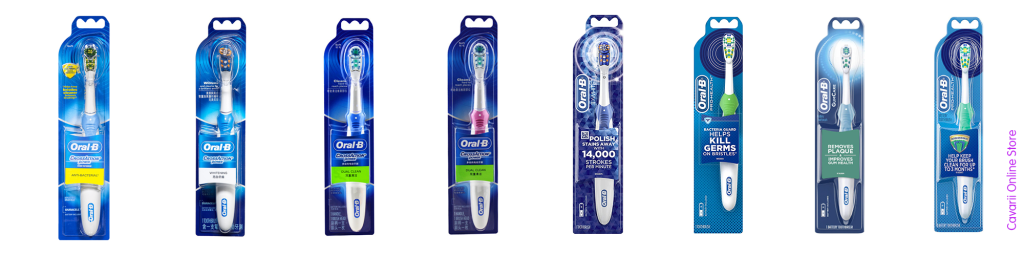
DB4510 – Powered by 2 x AA battery, sharing the same EB series of replacement brush heads as all the other Oral-B rechargeable electric toothbrush
Different DB4510 packaging from different countries, they differ in price, color, designs, branding and packaging
B1010 CrossAction Power – A whole new range of AA battery powered electric toothbrush, they have their own range of replacement brush heads.
Different B1010 packaging from different countries, they differ in price, color, designs, branding and packaging
b) Rechargeable Electric Toothbrush
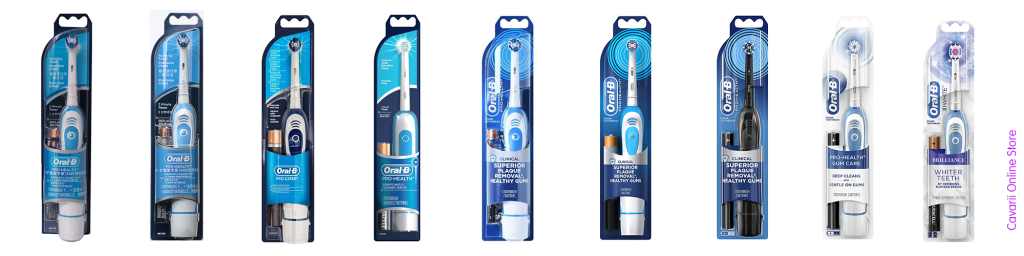
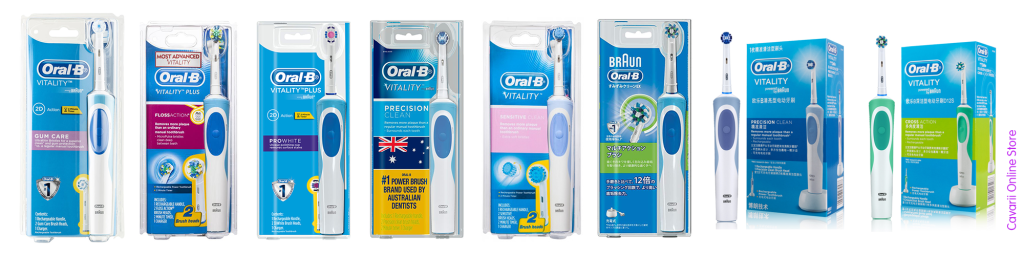
1) Vitality Series – This is the entry level range for Oral-B rechargeable battery models, with the lowest price, single cleaning mode, 2D brushing model, but they do comes in whole range of brush handle colors with different brush heads bundled;
Different Vitality packaging from different countries, they differ in price, color, designs, branding and packaging
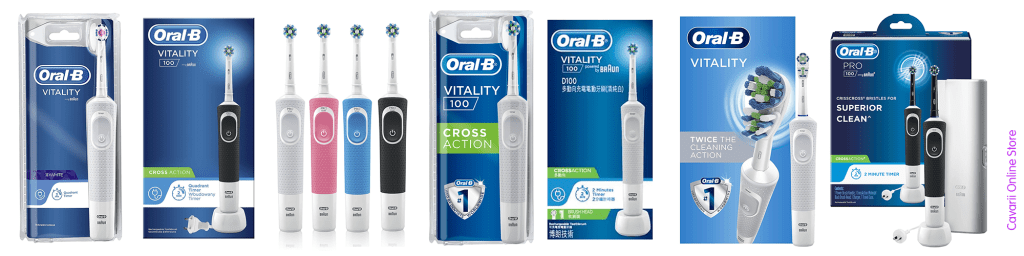
2) D100 Series – This is an upgrades to Vitality Series, comes with a new handle design,and usually comes with an extra cleaning mode
Different Vitality D100 packaging from different countries, they differ in price, color, designs, branding and packaging
3) Pro Series – This is the mid range series, and is one of the most popular series, partially due to the price point, and with just enough features for most buyers;
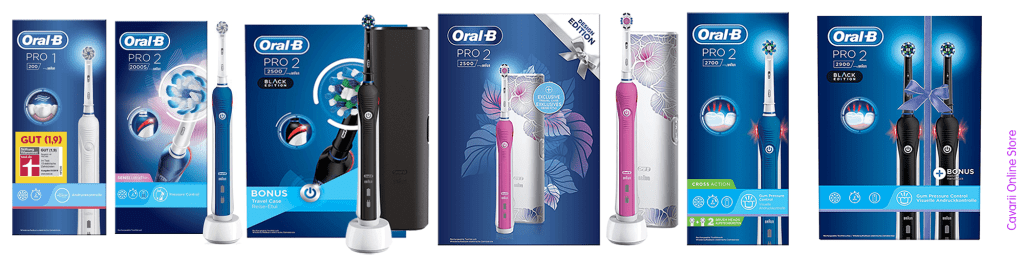
Different Pro series packaging from different countries, they differ in price, color, designs, branding and packagingDifferent Pro x x000 packaging from different countries, they differ in price, color, designs, branding and packaging
4) Smart Series – The Smart Series is a higher range than the Pro Series, and come with much more higher features, more cleaning modes, and advance features like bluetooth, which can be connected to Oral-B’s app;
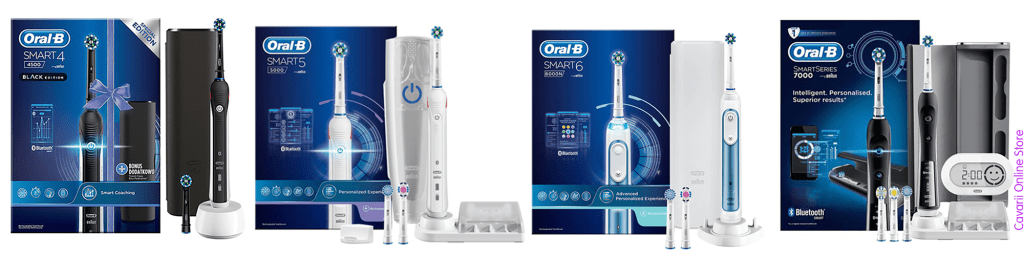
Different Smart series packaging from different countries, they differ in price, color, designs, branding and packaging
5) Genius Series – The Genius series is a premium range, with the most features, cleaning modes, as well as top features that are not available in the Pro and Smart series, e.g. Position detection, Smart rings etc
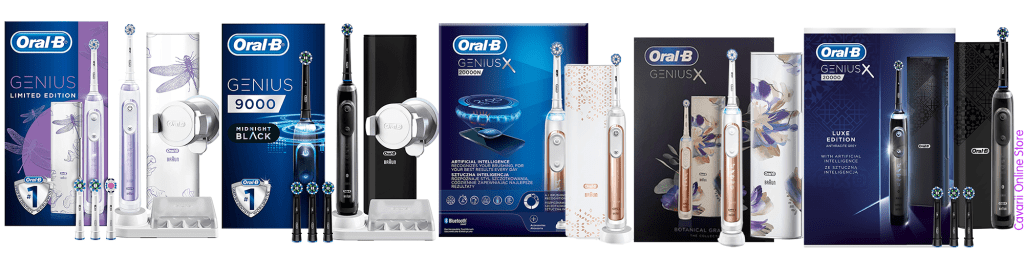
Different Genius packaging from different countries, they differ in price, color, designs, branding and packaging
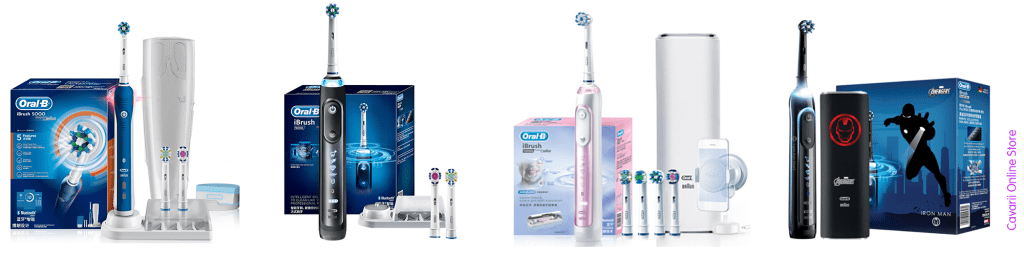
6) iBrush Series – Genius series is branded differently in China market, and they are branded as iBrush Series there, with almost the same features as Genius;
Different iBrush Series packaging from China
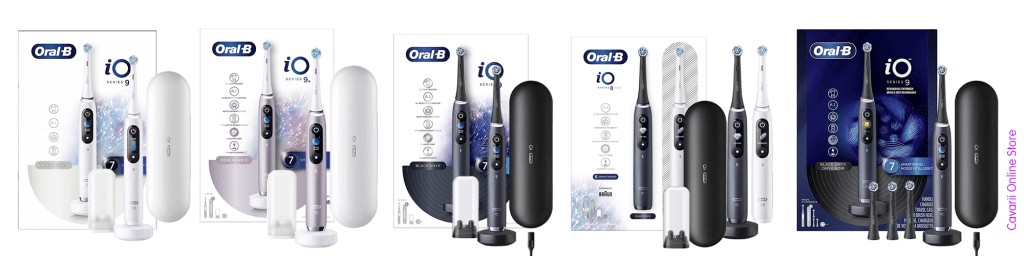
7) iO Series – This is the latest series from Oral-B, released in 2020, and the iO series is now the most Premium range of Oral-B product. They are designed totally different from all the above series, and with its own iO series of replacement brush heads, which are only compatible with the iO series brush handles;
What are the things to consider to pick the right model for me?
If you are a first time buyer, you may not be familiar with some of the basic features of Oral-B products, not all models have these features. You will need to understand what these basic features do, and whether you can do without them, or you would like to have them for your first purchase.
On average, each Oral-B’s brush handle lifespan is 2-3 years, very much depends on how you take care of the product and the lifespan of the built-in battery. You can either start with an entry-level or mid-range model, if budget is a constraint, get use to the features, and upgrade later to a higher-end model.
For the more adventurous buyer, you may want to jump start to a mid to higher end model, if you want to start using all the advance features immediately.
Features and benefits of Oral B Electric Toothbrush
The following give detail features and technologies from Oral-B, once you read and understand these features, you will have a better understanding of what features you need for your next Oral-B model, base on the budget that you are ready to spend.
Oral-B’s Brushing Technology – Oscillation and Pulsation
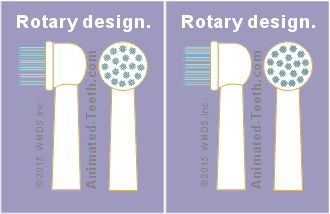
Oral-B toothbrushes with rotation-oscillation
The line of Oral B electric toothbrushes from Braun works an oscillation, and pulsation technology.
Pulsation – The brush head will be moving forward and backward movements rapidlyOscillations – The brush head will be rotating left-right, left-right rotary movement rapidly
The back-and-forth & left-and-right motion of a rotary brushing action will together form the 3D cleaning design.
The brush head surrounds each tooth and vibrates while rotating. Electric toothbrushes from Oral B can deliver over 48,000 movements per minute.
At 48,800 movements per minute, you’re getting 97,600 movements when brushing for two minutes. That’s the time that dentists recommend you spend brushing.
Why some Oral-B models are called 2D and some 3D?
For the 2D model, there are only left-and-right oscillation motions, whereas in the 3D models, the addition of back-and-forth motions mixing with the oscillation together formed the 3D effect of cleaning.
Clinically proven superior 3D Cleaning Action oscillates, rotates and pulsates to break up and remove more plaque than a regular manual toothbrush
Oral B 3D vs Manual
Various Brushing Modes
We wouldn’t be at all surprised if you were confused by the different cleaning modes that the Oral-B toothbrush may offer. Some entry-level models have just 1 mode, others 2, whilst some have as many as 6 modes. What do all these different modes do and why might you need them?
Each Oral B toothbrush has at least one brushing mode, usually the Daily Clean mode. Many of them have multiple brushing modes. There are 6 modes available across the devices. There’s Daily Clean, which is the clean commonly used daily. The Gum Care massage mode. That’s used to stimulate the gums. The Sensitive mode is a lowered power for those with sensitive gums and teeth.
There’s a Whitening mode that shines and brightens your teeth. The Pro-Clean was previously known as Deep Clean. It removes more plaque and film from your teeth. Lastly, there’s Tongue Cleaner. This is used to remove food and bacteria that’s hiding on the surface of your tongue.
Deep Clean is designed for exceptional mouth cleaning, featuring 45-second quadrant cleaning for a total brushing time of 3 minutes, enhancing the results of the standard 30-second quadrant clean of 2 minutes.
Each of these cleaning modes have different matching type or brush heads, and operate at different speeds and different duration of brushing time. For some, they may find these different brushing modes useful, and can switch between modes for different purposes, for different parts of the teeth.
Each cleaning mode has a brush head pairing that works together. The Daily Cleaning mode works well with any of the brush heads. The Sensitive mode works better with the Sensitive brush. The Whitening mode is enhanced with the 3D White brush.
FlossAction and CrossAction enhance any of the cleaning modes you choose. These are standard and deliver good brushing and flossing action. Most Oral B toothbrushes come with one or two brush heads. The rest can be easily ordered as needed.
The dentist recommended cleaning time for your teeth is 2 minutes, or 120 seconds every brushing session. Most Oral-B electric toothbrushes include a 2-minute timer to help you brush for the dentist-recommended 2 minutes. From the moment the brush is turned on, a built in timer is activated. At the end of the 2 minute cleaning cycle, the motor in the brush will stutter (pauses and restarts briefly) three times.
This pausing of the brush motor causes the brushing sensation to change as well as the sound of the brush. This is your signal that the 2 minutes of brushing time has been achieved.
Most people brush their teeth for under a minute, most just want to get over the brushing session as soon as possible, as for some people, brushing just before you sleep or just after you wake up is usually zombie time, where most remain in sleepy state.
This reminder feature will assist buyer to achieve the 2-minutes brushing time as recommended by dentists. Some buyer may think they can use a standalone stopwatch, or timer on their phones to monitor the 2 minutes.
Some of the entry level Vitality models do not have the 2 minutes reminder feature, while most models above 1000 all have these features built-in.
Rechargeable batteries in electric toothbrushes these days are either Nickel–metal hydride (NiMH) or Lithium-ion (Liion) cells. What are the differences? Is one better than the other?
This question is important because nearly all powered toothbrushes have build-in batteries, for safety reasons, you are not supposed to replace them, as they are sealed inside the waterproof handle. In order to be able to enjoy a long life, it is important to know how to treat your battery and what to avoid.
This question is important because nearly all powered toothbrushes have build-in batteries, for safety reasons, you are not supposed to replace them, as they are sealed inside the waterproof handle. In order to be able to enjoy a long life, it is important to know how to treat your battery and what to avoid.
NiMH
Lithium ion
Energy density
140 – 300 Wh/L
250 – 676 Wh/L
Cycle durability
180 – 2000
400 – 1200
Price
lower
higher
Technical comparisons of NiMH and Li-ion battery
Lithium ion batteries have a higher energy density than NiMH batteries. Smaller sized batteries allow to build slimmer handles. Another advantage of NiMH is the faster charging. There is no need to wait for 12 hours before you can use your new toothbrush.
Li-ion powered Oral-B models tend to last 10 – 14 days* after a full charge, as compared to 5 days* for NiMH powered models.
* base on 2 minutes brushing per session, twice a day, i.e. 4 minutes per day.
Most of the entry level comes in NiMH battery, some older higher-end model also comes in NiMH, while new higher-end model all come sin Li-ion battery.
Everyone’s felt the urge to brush with fervor and stick the bristles right up against the surface of your teeth. However, you’re not doing your teeth nor those bristles a favor. Vigorous brushing can wear down your enamel and shorten the lifespan of your bristles.
What is a pressure sensor? A pressure sensor, with respect to electric toothbrushes, are small components inside the brush handle that detect when you are applying too much force during your brushing routine. When it detects the use of excessive pressure, the brush will reduce the amount of power delivered to the brush head in order to reduce the chances of ongoing damage to the teeth and gums. If the excess force is removed, the motor will power back up to a fuller speed and perform as normal. This change can happen within split seconds.
The bristles of the brush should skim the tooth surfaces to sweep away, bacteria, food debris and plaque. Hard and aggressive brushing will not normally help, hence the pressure sensor to alert you to these instances where you do apply too much force.
The Visible Pressure Sensor is an important feature of higher end Oral-B models that score high points. Pressing too firmly with a toothbrush causes tooth abrasion. This is where the toothbrush starts to remove the enamel of a tooth and can lead to gum recession and tooth sensitivity.
The red low battery indicator light is nearer the bottom of the handle, it lights up when it’s time to charge your toothbrush, as there is only juice left in the battery for 1 or 2 more brushes. Now would be a good time to charge it.
Advance Features of higher end models
Apart from the basic features mentioned above, the higher-end Oral-B models/series also come with more advance features, this is for buyers who want all the added features and have a higher budget for an Oral-B electric toothbrush.
The following are the more advance technologies and features for the higher end Oral-B models like Genius & iBrush series:
Technology to Protect Gums
Oral B has delivered gum protecting technology in many forms. First, their toothbrushes have more plaque removal features. The circular nature of the brush itself is meant to remove plaque along the gum line. That makes for healthier gums.
They also have a Gum Care cleaning mode on most of their toothbrushes. It’s this mode that massages the gums to stimulate blood flow. Healthy blood flow to the gums can repair damage. It can also keep them from being damaged.
Lastly, the Pressure Sensor tells you when you’re brushing too aggressively. Hard brushing on the gums can cause gum recession. That leads to serious issues with your teeth as you age.
Position Detection
The latest models from Oral B have Position Detection. It uses facial recognition to “see” your mouth. The front-facing camera on your phone or tablet is where the facial recognition software acquires its target.
With this technology, the software and the toothbrush work together to ensure that you’re brushing all your teeth. It’ll visibly see where you’re brushing and show the positioning in the app. It’s an incredible advancement in technology.
Smart Guide
This compact unit acts as a clock when you’re not using it for your teeth. Once you turn it on, it works with the Oral B Bluetooth-enabled brush. It’ll show a timer and give you feedback on your use when brushing.
Some of the older models have this Smart Guide for tracking your brushing. It’ll show you a cleaning mode, mouth quadrants, and the correct time for each quadrant. The guide will give you a smile face for good brushing habits.
Dual Charging
The battery life of the toothbrushes are really incredible. You’ll get between 12 and 14 days of battery. The length of the battery will depend on the amount of brushing and how many people are using one handle.
Many of the Oral B toothbrushes have dual charging. It’ll allow you to charge your toothbrush and your smartphone or tablet. That’s important when you’re traveling. You don’t need to block more than one plug or port with your charging needs.
Brush Head Shapes
The shape of the brush heads were inspired by the circular head used in the dentist office. Theirs is a small, round brush that surrounds each tooth to get all the edges. It’s easier to remove plaque with this design than the long square brush head on a manual toothbrush.
Reasons You Should Use Oral B
Removes More Plaque than Competitors
The reason that Oral B removes a large amount of plaque comes down to the features. It has the patented round brush head. That cups the entire tooth when brushing. It was inspired by dentists since they use that type of brush professionally.
There are modes of cleaning focused directly on plaque removal. The brush heads focused on plaque removal can also be paired with the cleaning modes. Deep Cleaning from the Pro-Clean option is ideal.
Customized Brush Heads
There are more than plaque removing brush heads. There’s a brush head for whatever your oral care weakness. Let’s say your dentist wants you to focus on plaque, but you want to also focus on teeth whitening. You can get the brush head for plaque removal as well as the whitening one.
The brush heads can be customized for your oral care needs as well as the cleaning mode. The gum massage mode can be paired with the brush head for sensitive teeth. You can pick exactly the type of brush head and cleaning mode will benefit you most.
Smart Coaching through the App
The app can be downloaded for your smartphone or tablet. It’ll keep track of all your brushing habits. There are a few good reasons for this. That gathered data can be brought to your dentist when you go for cleanings and checkups.
It can also be used for real-time tracking. You’ll be able to see exactly when you miss areas of your mouth.
ADA Approved
The company has received the American Dental Association’s Seal of Approval. The ADA updated their guidelines in 2017 to be more strict. After vigorous testing, the ADA Seal was granted to the Oral B line of power toothbrushes.
It’s quite a validation for a toothbrush company. To get the Seal, the company had to meet dental standards. It allows dentists to recommend these products wholeheartedly to their patients.
Options for Tongue Cleaning
The Tongue Cleaning mode can be paired with any of Oral B’s brush heads. Not every toothbrush model has this option, but it’s a good one. Food and bacteria can hide in the tongue’s crevices. Cleaning the tongue removes anything hiding there, which reduces bad breath.
It’s important to brush your tongue at least once per day. The entire surface of the tongue should be scrubbed. That’s easy to do with the dedicated cleaning mode found on many of Oral B’s toothbrushes.
Faster Teeth Whitening
With a Whitening cleaning mode and a whitening toothbrush head, you’re going to get more whitening in a shorter amount of time. If you pair the cleaning mode and brush head with whitening toothpaste, you could have a whiter smile in just a few days.
The 3D White toothbrush head uses bristles to remove the stains on the surface of your teeth. In the middle of the bristles is a polishing cup. The bristles surround the tooth while the cup makes it brighter and whiter.
Conclusion
The Oral B line of toothbrushes provides fantastic benefits with all their features. They do more than clean your teeth. Even the most basic of their toothbrushes provide great cleaning power.
The patented round brush surrounds each tooth while the oscillations and rotations do all the work. They have an app that helps you track your progress. That data can inform future brushing plans.
Aside from the cleaning, the features will give you benefits like healthier gums. There will be less plaque along the gum line. You’ll have fresher breath and whiter teeth based on the modes you choose in your Oral B toothbrush.
There are 3 different types MAXTRA crtridges released by Brita
1) Brita MAXTRA Water filter cartridge
2) Brita MAXTRA+ Water filter cartridge
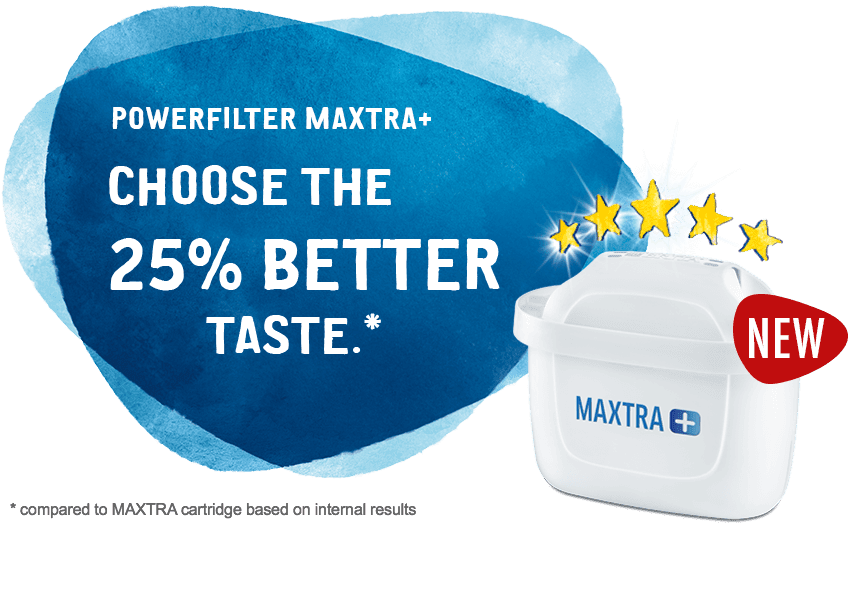
BRITA MAXTRA+ water filters provide an easy but highly effective way to provide you and your family with great tasting filtered water by reducing a number of impurities that exist in our tap water.
Here’s how the MAXTRA+ Filter works
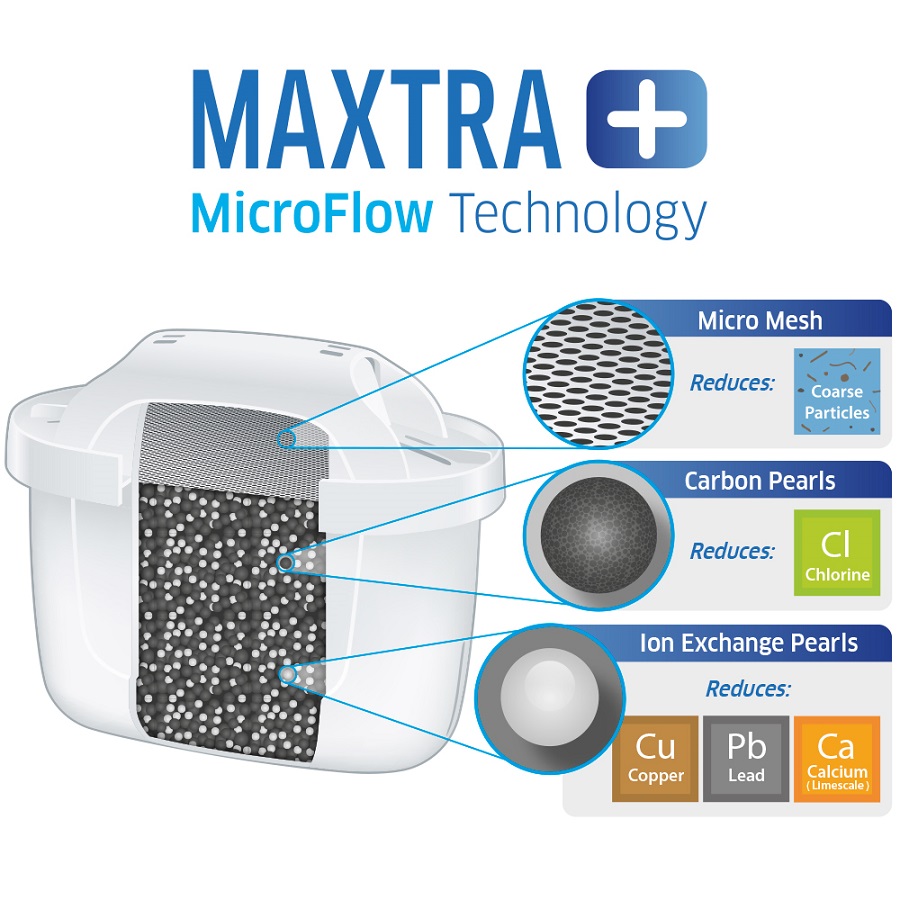
The unique MicroFlow technology features a mixture of Ion Exchange Pearls and Micro Carbon Pearls, formulated especially to provide expert levels of filtration for different water conditions around the world, including Australia.
As soon as the water comes into contact with the Ion Exchange Pearls, they bind and reduce any metals such as lead and copper that may possibly be present in household pipes. In addition, they also ensure reliable protection from limescale build-up by reducing any carbonate hardness of the water (calcium and magnesium ions) in the mains water. This is particularly important for certain areas of Australia and New Zealand where hard water is present as it acts as a “water softener”.
Meanwhile, the Micro Carbon Pearls, made from the carbon in natural coconut shells, absorb and lock away substances such as chlorine and chlorine compounds that impair the taste of drinking water.
Furthermore, the MAXTRA+ filter also contains a fine Micro Mesh for reduction of rough particles and a fine cartridge grid which effectively controls the exit of fine particles.
3) Brita MAXTRA+ Limescale Water filter cartridge
Introducing the latest advancement in-home water filtration, the MAXTRA+ Limescale filter, which removes 50% more limescale than the standard MAXTRA+ filter, whilst effectively reduces heavy metals such as Lead and Copper, chemicals such as Chlorine and other sediment.
The new MAXTRA+ Limescale filter is the premium filter in the range. It is especially formulated to suit those living in areas with moderate to hard water where the quality of drinking water and appliances such as kettle or coffee maker can be affected due to limescale build-up.
What’s Limescale?
While Australian household mains water is strictly controlled, limescale build-up could be a constant issue for those living in moderate to hard water areas such as Perth, Adelaide and parts of Queensland.
Hard water refers to water which contains a high mineral count and occurs when water passes through soft rocks like chalk or limestone and picking up the minerals from them. In these areas, you might find soap doesn’t lather as much and there are visible spots on glasses or shower screens due to the high mineral content left behind after the water is evaporated. Whilst this isn’t harmful, hard water often results in the unpleasant smell, taste and mouthfeel when drinking.
How does Limescale build-up affect coffee machines and kettles?
Limescale is the stubborn residue that builds up on surfaces which are repeatedly exposed to heated hard water such as the boilers inside coffee machines or heating elements inside kettles. As hard water runs through the heating element, it leaves behind sediments which over a period, can damage your machine or kettle.
Consequently, the Limescale build up can have a large effect on how your coffee machine functions: the temperature consistency of your machine, the efficiency of the pump and your final coffee volume. You might also notice excess steam, as well as increased noise.
This is why it’s important to regularly descale your coffee machine (as recommended by most manufacturers), however, this process can be both time consuming and costly over time. Depending on your coffee machine brand and the descaling agent used, each cycle can take up to one hour to complete while the cost ranges from $2 – 20 per treatment. What’s more? To avoid lingering chemical taste in the boiler, it is recommended to repeat the rinse cycle a few more times to ensure the residual descaling agent is flushed out.
How does BRITA MAXTRA+ Limescale filter work?
Prevention is the key! The new MAXTRA+ Limescale filter is our most powerful filter to date in tackling limescale build up. It features the powerful ion exchange pearls to effectively reduce 50% more limescale build up*, and heavy metals such as Lead and Copper while the fine mesh and grid effectively trap other sediment and impurities. As such, prolonging the life of household appliances such as kettles and coffee machines and providing cleaner drinking water for your family.
There are different types of mechanism deployed by Brita to keep track and remind user on the time required to change the filter cartridges
Brita pitcher filters may feature two different ways of noting when to change your filter. The filter cartridges should be replaced after 100 Litres, which the average family should use in 4 weeks, according to Brita.
The first method Brita uses is a fairly basic one. You just indicate the month you started using that filter, and then change it yourself after two months.
a) BRITA MEMO
The first method is a bit more accurate. The Smart Pitcher series like Aluna, Fjord and Marella uses an electronic change indicator, called Brita memo. When you first press the start button, all four bars will flash, showing that you have full filter life.
Every week, one bar will disappear to show the remaining cartridge life. After four weeks, all four bars will disappear. This, and a flashing arrow, indicate that the cartridge should now be changed. Insert a new cartridge according to the instructions, and reactivate the Memo as described above .
Unfortunately, since both methods operate on time and not on how much water has passed through, neither are entirely accurate. That being said, they do give a good idea of when to change your Brita pitcher filter.
How do I activate BRITA MEMO?
Simply press and hold the start button on the lid until four bars appear on the display and flash twice. Now BRITA MEMO will start the countdown. The flashing dot in the display’s bottom right-hand corner indicates BRITA MEMO is working. The number of bars on the display indicates the remaining lifetime of the cartridge in weeks, with one bar disappearing each week.
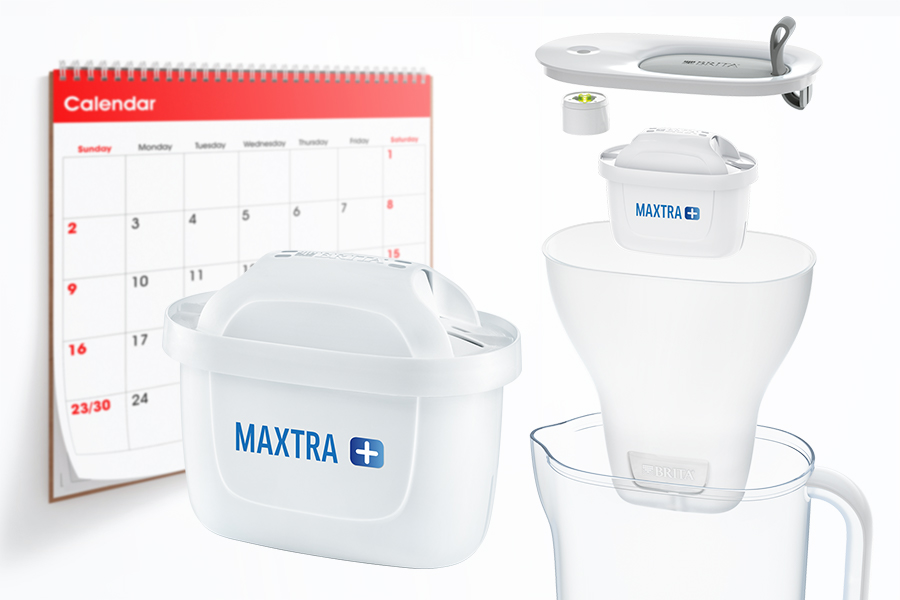
You should replace your filter cartridge at least every four weeks. That way you’ll enjoy optimum performance from your BRITA cartridge.
b) Brita Elemaris meter 2
The BRITA Elemaris Meter XL jug has an intelligent indicator for optimum BRITA water quality. It measures water hardness, volume and time.
c) Brita Style Jug’s Smart LED
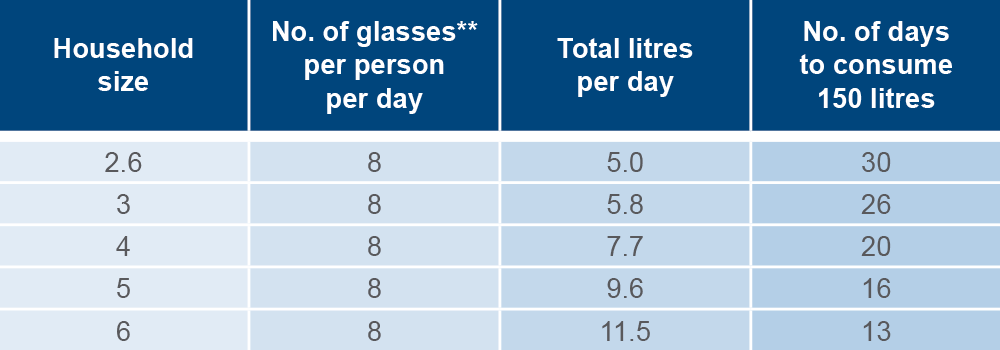
As filtered water consumption is increasing, Brita recommend replacing your MAXTRA+ filter every 4 weeks or 150 litres of water usage. This is based on the average household size of 2.6 people* and consumption of the recommended intake of 8 glasses per day** (based on an average glass size of 240ml).
As a starting point, Brita had developed the table below to help you calculate the recommended filter exchange frequency for your household. Of course, this timing can vary per household depending on your family size and water drinking rates of each person. At a maximum, we recommend to replace it no longer than 8 weeks to maintain optimum filtration results.
Don’t worry if you can’t keep track of when to replace your MAXTRA+ filter, BRITA has specifically designed a filter reminder indicator built into the BRITA STYLE water jugs to remind you when it’s time to replace your filter.
This is developed to help families make better decisions on when to replace their filter in order to maintain optimal levels of filtration.
How do I activate or re-set the BRITA smart light?
Press and hold the LED button on top of the lid until you see the light blinking 3 times in green. The BRITA Smart Light is now set and ready to use. The LED button will start flashing yellow during usage if it is time to stock-up with a new cartridge. As soon as it is flashing red, it is time to replace your cartridge.
How can I monitor the status of my filter performance?
You can check the status of your filtration performance any time. Simply press the LED button on top of the lid to see the current filter status.
What do the different colours of the Smart Light system mean?
Green light: MAXTRA+ Universal cartridge filters with optimum performance. Yellow light: It is nearly time to replace your cartridge, please stock up. Red light: Please exchange your cartridge. (This will be the case after either 4 weeks or 150L of filtered water)
Cannot Connect the Phone to Air Purifier – Troubleshoot
A number of users’ feedback had reported that they cannot connect the Mi air purifier to the network, making them unable to control the Air Purifier using the smartphone or could not bind the mobile APP Mijia with the Air purifier, and other issues.We will troubleshoot such problems from 3 major sources, the phone, the network (router end) and the air purifier.
Note – For first time setting up
Please choose “China” as connection region in the App settings.
Connect only to 2.4GHz Wifi network, not 5GHz Wifi
a) The Phone
i) Check to see if the phone is connected to your Home / Office network
ii) Check to see if certain privileges may be disable for the “Mi Home” or Mijia APP on your phone settings;
b) The Network (Router End)
i) While Mi air purifier supports most routers, but it only supports 2.4GHz WiFi, not 5GHz;
ii) The WiFi encryption must be WPA or WPA2 (without encryption can also be connected, but not recommended for security reasons), it does not support WEP and EAP 802.1x authentication;
iii) Failure to support the needs of the page authenticated network, for example: CMCC, ChinaUnicom other public networks;
iv) Some routers may not be able to connected, so far identified router models are : TP-LINK WDR6300 (unless set up to use only 802.11b), TP-LINK WR880N (shutting down WMM may resolves);
v) Routers with advanced features set-up. like hidden SSID, disabled QOS, non DHCP settings where you need to set a static IP manually, or the router settings that requires MAC address binding may all result in not able to connect the Air Purifier to the network;
vi) Close all router wireless control for blacklists;
vii) The company intranet which had disabled port 80 or UDP may lead to not work properly with the air purifier;
viii) Does not work if you are connecting to portable USB routers;
c) The Air Purifier
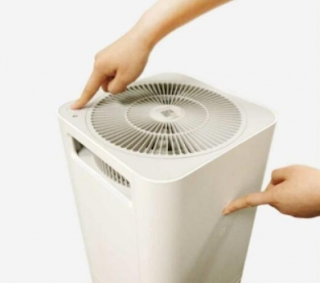
Air Purifier may had been configured previously to connect to another network, or is currently connected to other network, please reset the Air Purifier WiFi settings by pressing the “Operating Mode Choice” and “Switching of Indicator” button simultaneously and hold them for 5 seconds. After you hear the beeps sound, WiFi settings is reset.
Other Commonly encountered problems
Problem 1 Mijia App displayed error message when trying to connect to the Air purifier
“No available WiFi, please check if appropriate permissions had been restricted
Resolution 1 Under phone’s settings, enter the “Security Center” >> “Authorization Management” >> “Application Rights Management”, open the “smart home” network-related rights, and locate permission. (Note: settings may be slightly different with different OS and model of phones)
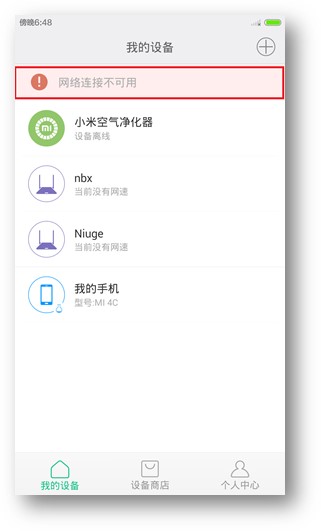
Problem 2 Mijia APP showing “Network connection is unavailable” message, as shown in picture
Resolution 2 Open the phone’s WiFi or data network and then try and make sure the network, or other similar software does not disable the “Mijia” APP network connection.
Problem 3 When Mijia app trying to connect to air purifier, APP showing “Connection Failed” and the purifier cannot be bind, WiFi status indicator is flashing slowly.
Resolution 3
a) when connecting to WiFi, make sure password entered is correct;
b) Whether router is connected to Internet
c) Whether routers is using a WEP or EAP 802.1x encryption, as they are not supported, please replace with WPA / WPA2 authentication and try again;
d) Currently does not support the EAP 802.1x authentication network or public WiFi network that requires web authentication on landing page;
e) Whether router is configured with hidden SSID, disabled DHCP and requires a manually assigned static IP, MAC address binding and other advanced features, making it impossible to connect, try to turn on / off the relevant function and try again;
f) whether the router is connected to a device that may had slowed down the network or router, try to restart the router and try again;g) Some of the routers may not be supported, such as: TP-LINK WDR6300 (try setting up using only 802.11b), TP-LINK WR880N (disable WMM may resolve problem), wait for a new version of the Mi Home APP and try again after the app update, you may need to try other routers temporarily in order to use the air purifier;
g) If all of the above still cannot solve the problem, try doing a factory reset of the Air Purifer by pressing the “Operating Mode Choice” and “Switching of Indicator” button simultaneously and hold them for 5 seconds. After you hear the beeps sound, WiFi settings is reset.
Problem 4 Under the Mi Home APP, the purifier is show “offline”, but the WiFi indicator on air purifier is flashing quickly
Resolution 4 a) Whether the router that the purifier is connected is working properly, OR whether the SSID connection password had been modified;
b) Try to reset the purifier WiFi module (see step 3h above), and try to re-connect the App to the air purifier again,
Problem 5 Under the Mi Home APP, the purifier is show “offline”, but the WiFi indicator on air purifier is always on
Resolution 5 a) Check the phone network is normal, whether you can connect to the network;
b) The network where the air purifier and hand phone connected is working properly;
c) Whether the router had blocked port 80 or disabled UDP;
d) Try to reset the purifier WiFi module (see step 3h above), and try to re-connect the App to the air purifier again,
3. The different WiFi indicator for air purifier
a) Slow flashing (approximately flashing once every 0.8 seconds): Purifier had never been connected to the router,
b) Flashing quickly (approximately flashing every 0.2 seconds): The air purifier is binded to the Mi Home app, the air purifier is in the process of connecting to a corresponding network, if the network has a fault, the quick flashing will remain;



















 Cavarii Online Store