Blog Feed

Setting up WalkingPad A1 & A1 Pro

Installing Mijia / Mi Home App
WalkingPad A1 & A1 Pro is part of the Xiaomi Eco system family group of managed devices, if you have not install Mijia app prior to this, you may want to install the Mijia app first before continuing with the Setting up of the WalkingPad A1 & A1 pro

See – All About Xiaomi’s Mi Smart Home App (Mijia)

Installing and setting up the WalkingPad A1 & A1 pro under Mijia App

Note 1: you must already have the Mijia App installed and log in with your Mi Account before you can proceed with setting up the WalkingPad below

Note 2: The following is done with screen captures from IOS version of Mijia App, the Android version may differs slightly. Screen captures are done in August 2019, and may differ in future versions of Mijia App.
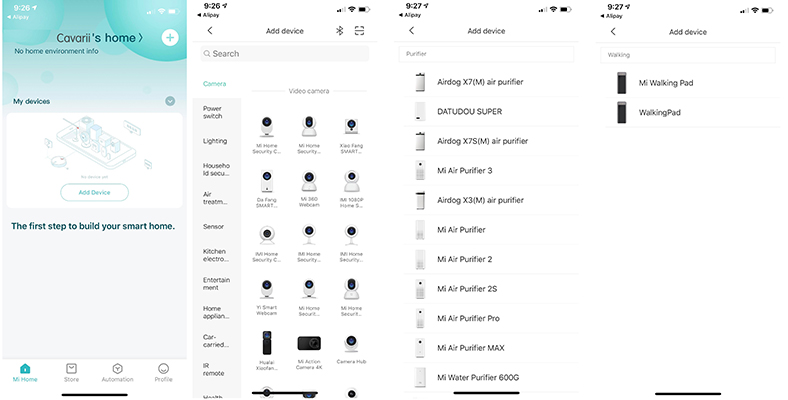
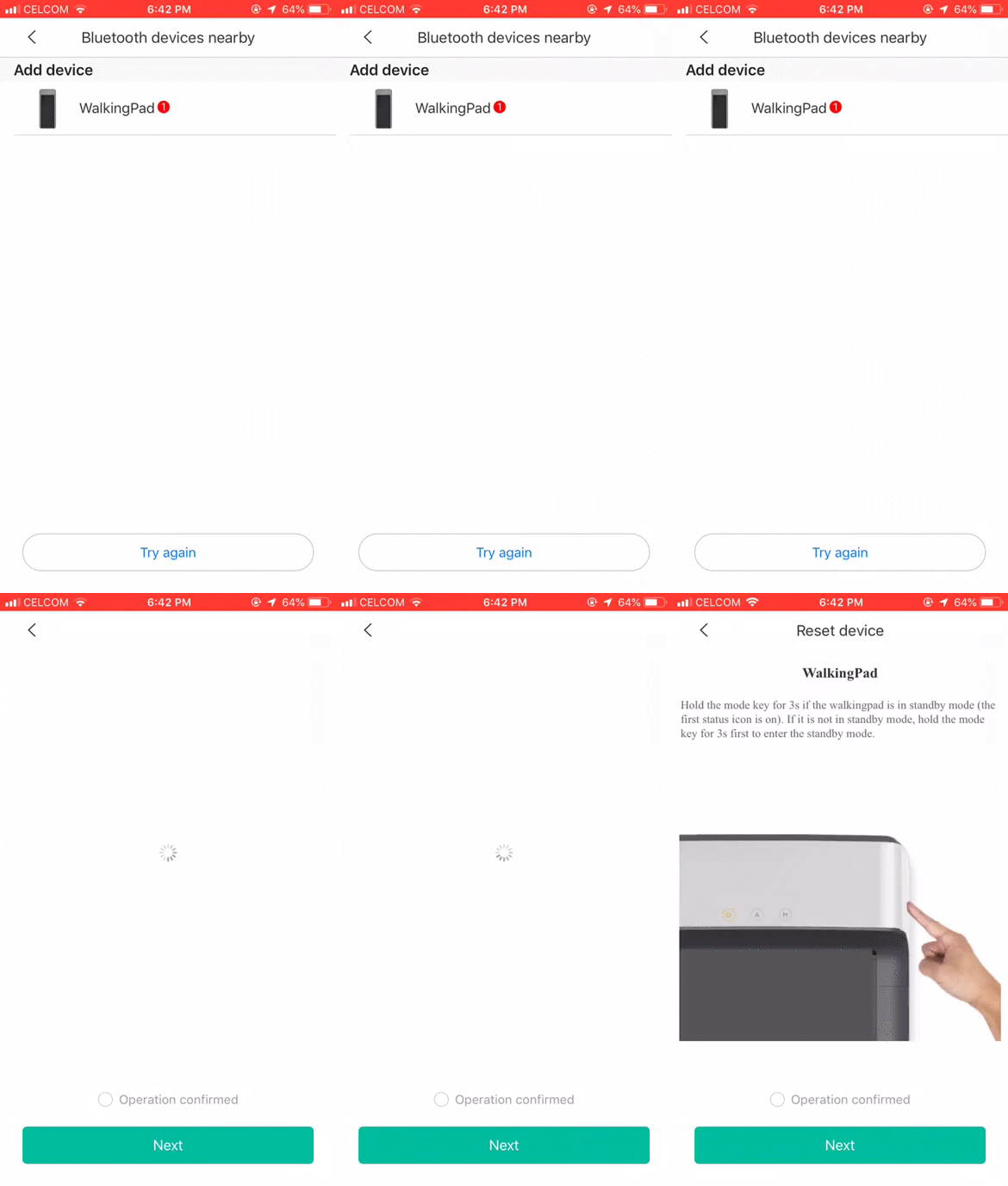
Click on the “+” icon on right hand top corner to add device, and a list of devices will be listed, you can search the device that you want to add, e.g. “purifier” or “WalkingPad”, then click on the correct device to add
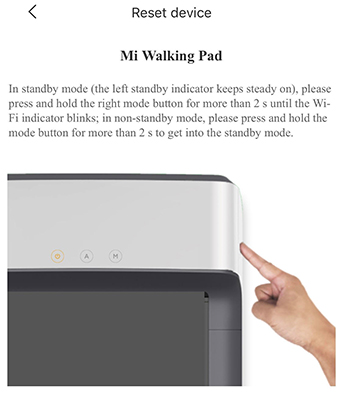
Once WalkingPad is selected, you will need to set the WalkingPad in standby mode by pressing the right mode button for more than 2s until the WiFi indicator blinks, only then will the Mijia App be able to detect the WalkingPad, and pair with the App
Remember to click “Operation Confirm” and “Next” button once the WalkingPad is detected by the app.

Troubleshooting and technical background of setting up
Technically the Mijia app will use bluetooth to detect the WalkingPad during the initial setting up while the WalkingPad is on Stand-by mode, with the WiFi icon blinking after u press the Right mode button on the WalkingPad.

Once detected the device, the App will grab an IP from the 2.4GHz wifi network, if the router is set-up as DHCP, and assign the IP to the WalkingPad, and update this setup back to the Mi Clouds, if there are firewall setup on the router, or the router setup being non-DHCP, it can’t assign an IP to the walkingPad, this may have cause the non connection.

After setting up, no bluetooth connection is needed anymore. And all communications between the App and WalkingPad is via the Wifi network, this including using the App as a virtual Remote Control, updating all your activities on the WalkingPad into Mi Clouds, for data analysis, and storage.

During setting up, please make sure you have:
a) Your phone’s bluetooth on;
b) Select China as Country/Region on App;
c) Connect only to 2.4GHz WiFi network;

The app will obtain an unused IP from the router and assign to the WalkingPad, so that it will be connected to the same WiFi network for continuing control communication from the App to the walkingPad, excessive restrictions on network security like non-DHCP, firewalls or all IP range on router all fully utilised may result in WalkingPad not able to be assigned an IP and resulted in connection failure.

Going Through the Novice Guide to unlock the WalkingPad.
The new WalkingPad is in learner mode when newly open, and will cap the maximum speed to just 3km/h walking speed. You will need to use the Mijia App to connect and go through the Novice Guide, for a learner’s step-by-step guide on proper usage of the device, before the full features can be unlocked. Afterwhich you can set walking speed higher than 3km/h, plus using the mode advance “Auto mode”.

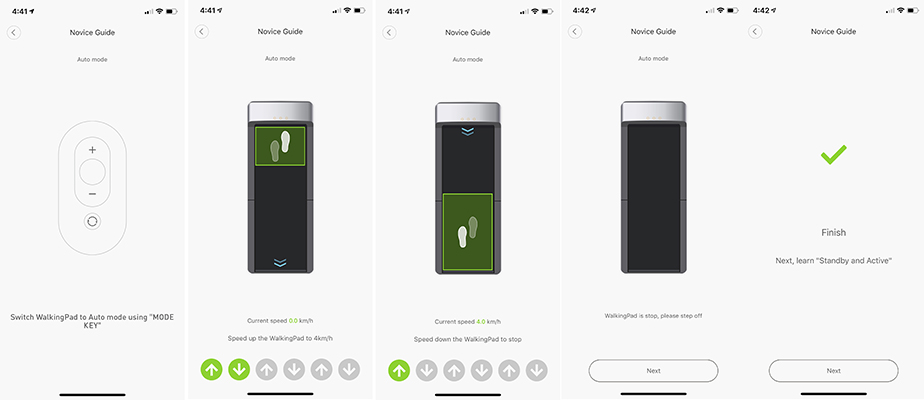
If everything is ok, and you are able to detect the WalkingPad, you will start the Novice Guide as follow:

a) Manual Mode
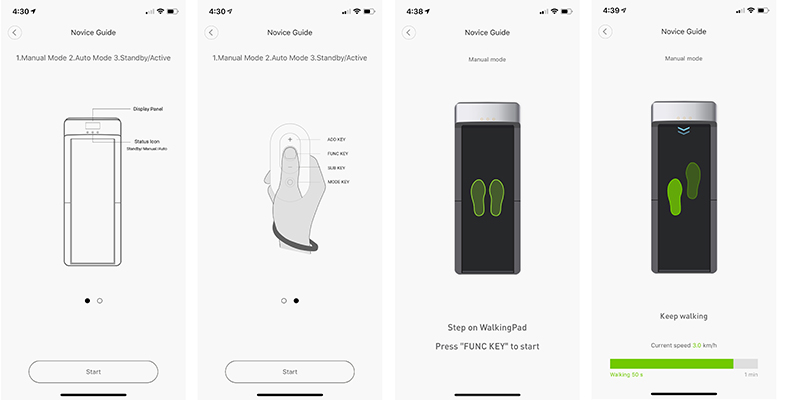
Overview of the Walking Pad and Remote control keys , and start walking at 3km/h speed for a minute.
Use the remote control key to increase the speed to 4km/h

b) Auto Mode

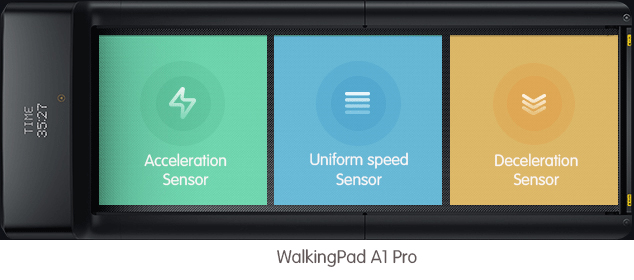
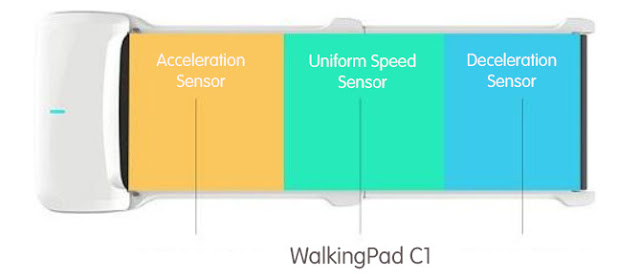
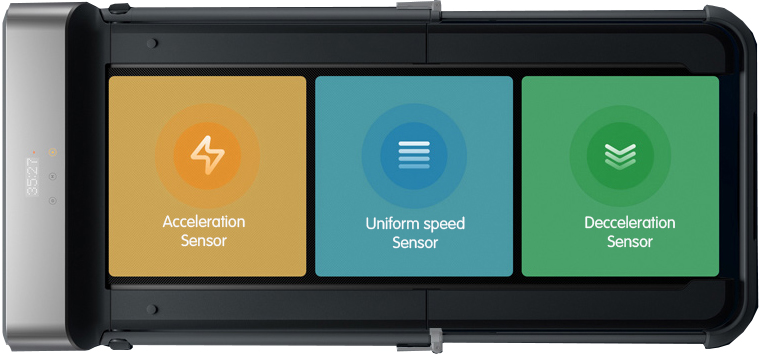
Here you will go through the auto mode 3 times by stepping on the top part of the walking belt to increase speed and bottom part of the belt to reduce speed, then complete the “Auto Mode” training.

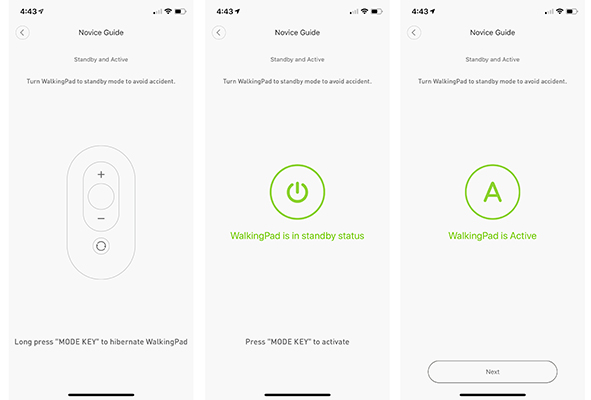
c) Changing Modes

You will learn how to switch modes

d) Other Settings, complete nocive guide and unlock features
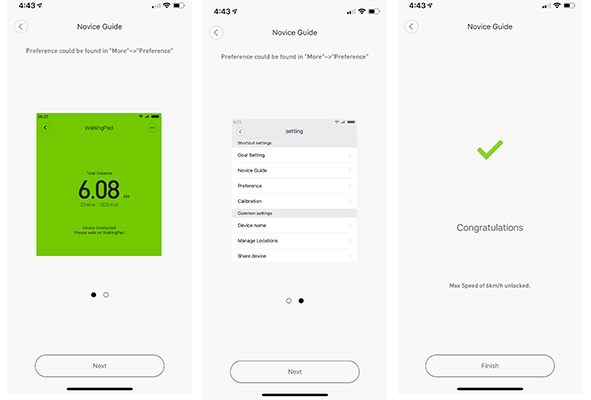
The final steps is showing you the other settings of the Mijia App, where you can further customise your own settings, after which you will complete the Novice Guide and full UNLOCK the speed and features of the WalkingPad

e) Additional Settings
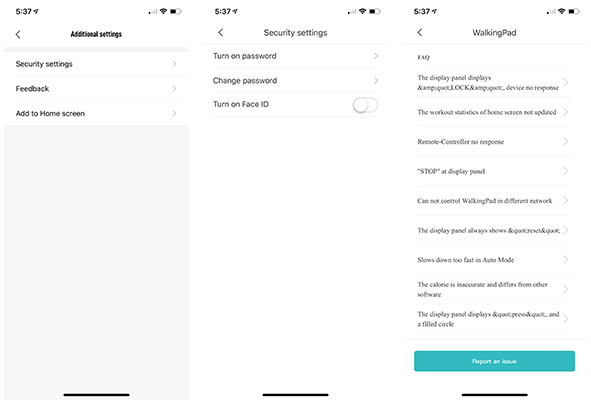
There are other settings that you can customise with the WalkingPad, the following are the few samples:
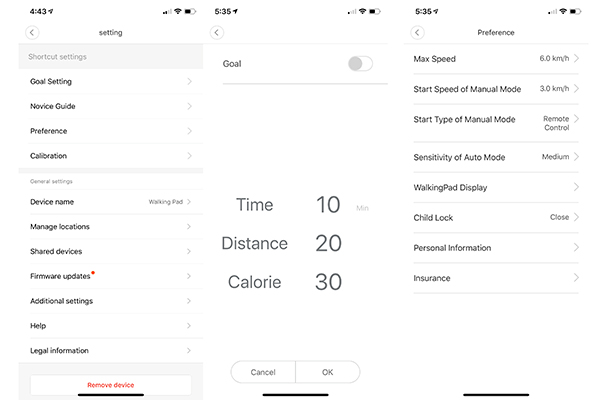
You can set your Goal and Preference.

You can also set the walking machine in the Mijia APP, including the maximum speed of the walking machine, the starting speed of the fixed speed mode, the start and stop mode, and the automatic mode sensitivity. By setting the walking machine mode, the user can also be safer in use.
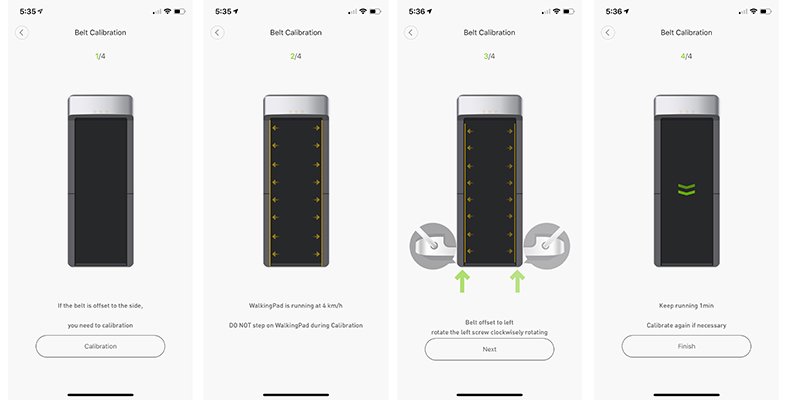
Calibrating the walking belt
Additional settings, security settings & FAQs
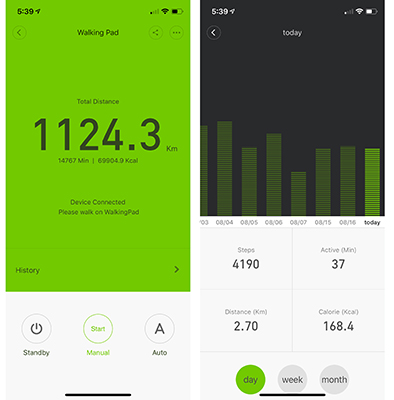
All the stats for using the WalkingPad
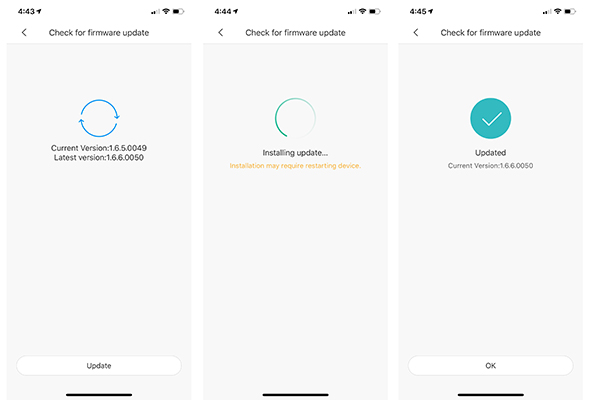
Upgrading firmware

Oral-B Genius 9000

Oral-B’s Genius Pro 9000 is the brand’s flagship model. This comes in black / Rose Gold / White brush is packed with a series of features that all contribute towards providing consistently good performance. In terms of technology, build, and cleaning capabilities, this is an all-round superior option for anyone who has the additional budget for it.

Oral-B Genius Pro 8000

First, let’s review the technology. The Genius 9000 can be used in tandem with the brand’s mobile app. This works with you in tracking your mouth health, reading the position of the toothbrush, and recording how well you’ve been brushing. However, I found the app a bit difficult to use and preferred using the electric toothbrush without it.

This model is also equipped with a pressure sensor technology which manifests in a ring indicator called the SmartRing. The SmartRing indicator turns orange whenever you are pressing too hard, so you are alerted immediately and you can adjust your approach accordingly.

When you buy the Genius 9000, you also get a smart travel case that can charge both your toothbrush and your smartphone. This is definitely an advantage for frequent travelers, who may need to charge while on the go but don’t have enough time to set aside.

Next, the cleaning modes. This device comes with all six. There’s Daily Clean, Sensitive, Whitening, Gum Care, Tongue Cleaning, and Pro-Clean Mode. You can choose to switch our brush heads if you want to switch between cleaning modes. However, make sure to check if the package you’re buying comes with additional brush heads so you can estimate how much you have to shell out beforehand.

If you take a close look at the accompanying brush head, you’ll notice that the bristles are arranged in three different ways. There’s the outer layer which is angled counter-clockwise, an inner layer which is angled clockwise, and then the central part with a pair of bristles to complete the design. These layers work together to make sure that regardless of where you’re aiming your toothbrush, you’ll get a thorough clean every time.

The Genius 9000’s Lithium-ion battery can last two weeks on a full charge.

Another drawback I found was that it was slightly heavier than most electric toothbrushes. It also vibrated a lot and made a lot of noise as I was using it. However, these drawbacks are probably necessary to accommodate all the power that this toothbrush has. If you are looking for an upscale toothbrush with the latest developments in the dental industry, then this model is right up your alley.

Note : The above review is extracted from bestelectrictoothbrushlist.com

Position Detection Technology

If you connect your electric toothbrush to the mobile app, Oral-B’s facial recognition technology helps you guide your brushing from one zone to another, so you know how much time and effort to spend across the different zones.

With this technology, the software and the toothbrush work together to ensure that you’re brushing all your teeth. It’ll visibly see where you’re brushing and show the positioning in the app. It’s an incredible advancement in technology.

Note : This feature is only available with the highend Genius / iBrush series

Introducing Position Detection
Cleaning Teeth with Position Detection

Oral-B Genius 8900

Family Pack of Genius 8000
The Oral-B Genius 8900 is effectively a glorified Oral-B Genius 8000 with an additional bonus electric toothbrush handle. Think buy one get one handle free.

If you need two electric toothbrush handles for the family, the Oral-B Genius 8900 is the most economical way to do it and offers great value for money. The electric toothbrush handles themselves are top of the range electric toothbrush handles that offers a great range of features for a cheap price.

Effectively this Oral-B Genius 8900 is 2 x Oral-B Genius 8000 electric toothbrush handles being sold together at a discounted price

The Oral-B Genius 8000 is a premium electric toothbrush made by Oral-B. It is very feature rich and high tech for a toothbrush. It has bluetooth connectivity, position detection and smart phone holder to name just a few of the features.

Styling
This electric toothbrush comes in only one colour white. It is a very good looking electric toothbrush with two buttons on the front of it, an on/off button and a down button and a soft touch rubberised grip on the back. The handle size is slightly chunkier than the slimline Pro series, however this makes the Oral-B Genius 8000 feel more solid. On the front of the electric toothbrush is four pictures that light up to indicate what cleaning mode you are in. This is a neat feature that cheaper electric toothbrushes in the Oral-B range do not have. There is also a symbol to indicate when the Bluetooth has been switched on and a battery indicator light as well.

Quadpacer
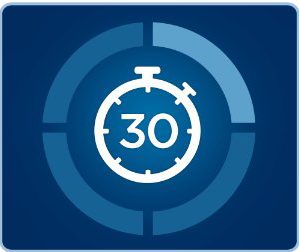
The Oral-B Genius 8000 features the Oral-B Quadpacer timer which is a timer that “buzzes” every 30 seconds. These 30 seconds corresponds to when you should change area of the mouth and we find it a useful reminder when brushing. It also buzzes twice to indicate when the two minutes are over and you can stop brushing.

Bluetooth connectivity, smartphone holder and position detection
As standard on the Oral-B Genius 8000 it comes with bluetooth connectivity which allows it to connect with your smartphone. If you have an apple phone or android, there is an Oral-B app out there. The Oral-B app has gone through many versions and although a little glitchy to start with it is now much improved.  Some of things that the Oral-B app does is:

  • Sends push reminders for you to brush your teeth twice a day
  • Motivates you to keep brushing your teeth by giving you achievements and badges, a bit like fit bit for your teeth
  • Gives professional guidance about how to brush your teeth better

With the Oral-B Genius 8000 the Oral-B app also has additional functionality with position detection and a smartphone holder. The smartphone holder is a useful addition as often you don’t want to put your phone down next to the sink (most smartphones are not waterproof). The smartphone holder looks like something you may have in your car, a suction pad to stick onto a mirror and some grippers to hold your phone. It is simple but effective.

The reason the smartphone holder is needed is for proper use of the position detection. What position detection does is spot the areas you are missing whilst brushing. It is really common for people to brush one side of their mouth well and the other side badly. Usually this is the left hand side of your mouth if you are right handed and vice versa. Position detection points out the areas that you have missed and means you clean your teeth better.

Visible pressure sensor and 360 degree smart ring
Like it’s brethren the Oral-B Genius 9000 (which is also an excellent electric toothbrush if a tad more expensive) the Oral-B genius 8000 has a visible pressure sensor and a fully customisable 360 degree smart ring. I think a visible pressure sensor is an essential addition for any good electric toothbrush as most people press too firmly when they brush. This leads to unnecessary toothwear which ultimately causes sensitivity and gum recession.

The 360 degree smart ring allows you to customise the colour that the visible pressure sensor flashes. You have a choice of 12 colours which is a nice touch.

5 Cleaning Modes
The Oral-B Genius 8000 comes with 5 cleaning modes which can be accessed by pressing the down arrow button on the front of the electric toothbrush.

Daily Clean Mode
The standard cleaning mode featured on almost all Oral-B electric toothbrushes. This is the cleaning mode we use the most because it is the most useful for everyday use. It lasts for the recommended 2 minutes of cleaning and also oscillates 8,800 times and pulsates 40,000 times per minute.

Gum Care Mode
A cleaning mode where the Oral-B Genius 8000 pulsates for 2 minutes that is meant to encourage bloodflow to your gums by massaging them. It changes the power and speed of the brush head from oscillating 2,600 – 8,800 times per minute and 12,000 – 40,000 pulsations per minute.

Sensitive Mode
We like this cleaning mode as it is a reduced power daily clean mode. This is particularly useful for people with sensitive teeth or people who tend to press too firmly with their toothbrush. In this mode the Oral-B genius 8000 will oscillate at 6,500 times and 30,000 pulsations every minute. The cleaning mode lasts for 2 minutes.

Whitening Mode
This cleaning mode does not whiten your teeth. In fact no toothbrush can actually whiten your teeth. They can remove stains which may your teeth appear whiter but this is not whitening. This cleaning mode is effectively a 2 minute 20 second daily clean mode.

Pro-Clean Mode
A longer duration 3 minute 30 second daily clean mode that oscillates 8,800 and 40,000 pulsations per minute. Not to be used for regularly but can be particularly useful if your teeth feel particularly grubby for example after coming off a long haul flight. We use this cleaning mode sparingly on the Oral-B Genius 8000.

Brush Heads
The Oral-B genius 8000 is compatible with the Oral-B range of replacement brush heads. Oral-B do offer a great range of brush heads which are cheap and good quality. Our particular favourite would be the Oral-B Cross Action because of the angulation of the bristles and small, round head size. The Oral-B Genius 8000 comes with a cross action brush head, a sensitive brush head and the Oral-B 3D white.

Battery Life
One of the best things about this electric toothbrush is the extended battery life. On cheaper models in the Oral-B range, the electric toothbrushes will only last for 5 days (around 20 minutes of usage) however on this electric toothbrush the battery should last 2 weeks (around 48 minutes of usage). This is much more practical as there is nothing more frustrating than getting to your electric toothbrush and it is flat.

Also the battery recharges quickly taking 5-6 hours from flat. This is because the Oral-B Genius 8000 has a superior quality lithium ion battery.

The charging station featured on the Oral-B Genius 8000 is simple in design but effective. It houses 4 extra brush heads which is useful if sharing the same electric toothbrush handle or if you use different brush heads in the morning and evening. The charging station has a 2 pin plug which means that you will either need a shaving plug in your bathroom or a 2 pin to 3 pin adaptor. The adaptor can be picked up at local hardware stores.

Travel Case
The Oral-B Genius 8000 comes with a beautiful, premium travel case. Although this does not charge the toothbrush and a smartphone like the Oral-B Genius 9000, it is still a really good quality travel case. The travel case comes in white and has a leather effect covering which is soft to the touch. It houses the Oral-B Genius 8000 electric toothbrush handle and 2 x brush heads.

The Oral-B Genius 8000 is slightly chunkier and heavier than the Oral-B Pro series or Smart Series range however it is still light enough to fit into your hand luggage when travelling on your holidays.

What is the difference between the Oral-B Genius 9000 and Oral-B Genius 8000?
The Oral-B genius 9000 comes with a travel case that can charge a smartphone and the electric toothbrush handle. The Oral-B Genius 9000 also comes with a tongue cleaning mode.

2-Minutes Reminder/ Timer and Quadpacer

The above video illustrate the Quadpacer stutter every 30 seconds and the stutter at the end of 2 minutes

2-Minutes Timer / Reminder

The dentist recommended cleaning time for your teeth is 2 minutes, or 120 seconds. Oral-B electric toothbrushes include a 2-minute timer to help you brush for the dentist-recommended 2 minutes. From the moment the brush is turned on, a built in timer is activated. At the end of the 2 minute cleaning cycle, the motor in the brush will stutter (pauses and restarts briefly) three times.

This pausing of the brush motor causes the brushing sensation to change as well as the sound of the brush. This is your signal that the 2 minutes of brushing time has been achieved.

With Vitality models, the brush will stutter just once — after the 2 minutes is up, it won’t shut off but will simply stutter a little more noticeably to let you know that you’ve brushed for the recommended time.

Quadpacer / Quadrant Timer

Although not present in all Oral-B models, the vast majority have what Oral-B call a professional timer. Also known as the Quadpacer or Quadrant Timer, this is an additional feature which assists in the brushing routine.

With most other PRO series models, the brush will stutter or shake briefly every 30 seconds (Quadpacer) to let you know it’s time to move to another area of your mouth, and after the 2 minutes is up, the brush will stutter to let you know that you’ve brushed for the recommended time.

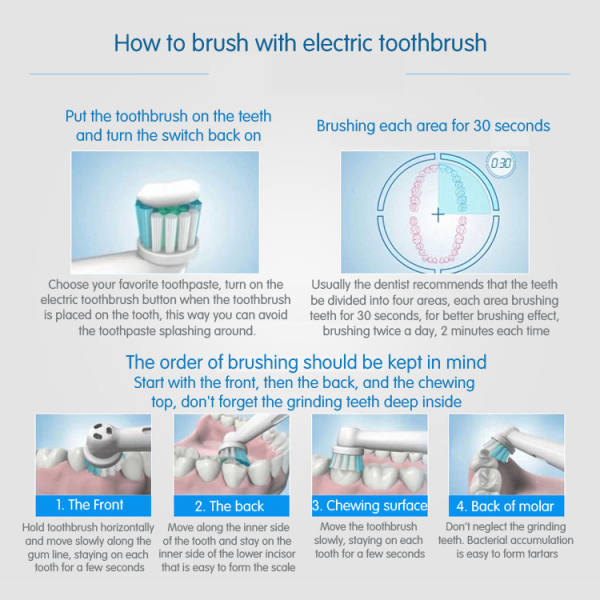
During a 2 minute cleaning cycle, there are four periods of 30 seconds.  The idea behind the pacer is that you spend 30 seconds brushing each quadrant of the mouth.

Imagine breaking the mouth up into four sections, upper right, upper left, lower right and lower left. If you spend 30 seconds cleaning the surfaces of the teeth in each quadrant, by the end of the 2 minutes, you will have brushes evenly around the mouth.

If you have a Bluetooth enable toothbrush, the app will give visual representation of this timer and pacer feature on screen in real time.

Some Cleaning Modes have extra or shortened time
For oral-B model that has the Deep Clean (Pro Clean) mode and Whitening modes, the brush’s brushing/quadrant timer is lengthened to 3 minutes instead of just 2. While the Tongue cleaning mode is shorter than this at just 20 seconds.

Will it stop after the 2-minutes reminder is up?

When you are done brushing you’ll need to manually press the on/off switch to turn the toothbrush off, otherwise it will stay switched on. They don’t have an automatic cut-off because you might want to continue brushing to make sure you’ve got as good a clean as you’d like. After all, it’s your toothbrush to use as you wish!

Original post from Oral-B official site here

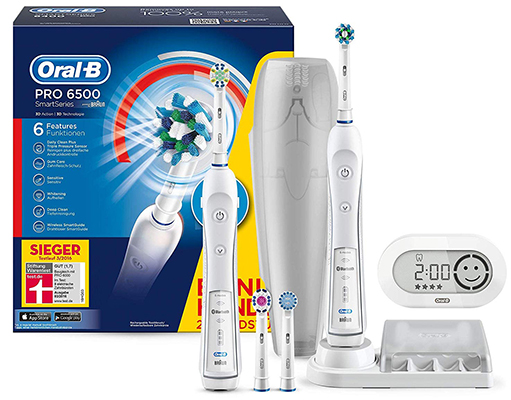
Oral-B Smart Series 6500

The Smart Series 6500 is effectively a glorified Oral-B Pro 6000 with a an additional bonus electric toothbrush handle. Think buy one get one free.

If you need two electric toothbrush handles for the family, the Oral-B Smart Series 6500 is the most economical way to do it and offers great value for money. The electric toothbrush handles themselves are top of the range electric toothbrush handles that offers a great range of features for a cheap price.

Effectively this Oral-B Smart Series 6500 is 2 x Oral-B pro 6000 electric toothbrush handles being sold together at a discounted price.

Oral-B Smart Series 6500 Features

5 Cleaning Modes – The primary reason many people opt to spend a little more for the Smar tSeries 6500 is for the multiple cleaning modes available to suit your needs, and for a more rounded cleaning experience.

  1. Daily Clean is the default mode for regular cleaning.
  2. Pro Clean operates at a higher frequency for more extensive cleaning when needed.
  3. Sensitive is gentler on your teeth to avoid pain, but still allows you to clean your teeth sufficiently.
  4. Whitening allows you to polish your teeth and can be used occasionally or daily.
  5. Gum Care provides a gentle massaging effect on the gums to stimulate blood flow and improve gum health.

Bluetooth Compatibility
Just one of aspects that makes this toothbrush so smart is it’s Bluetooth compatibility. It allows you to connect to the Oral-B app on your smartphone or tablet so you can learn more about your oral cleaning routine and brushing habits, and informs you of ways to improve them. While the app is geared toward the higher end ‘Genius’ line of Oral-B toothbrushes, it can still be helpful in letting you know the battery life, what mode you are in, when you are brushing too hard and more. It also saves data of the last 20 brushes automatically and syncs it when you open the app again.

Smart Wireless Guide

Smart Wireless Guide
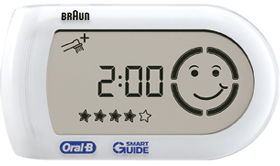
In addition to being able to connect to your smartphone, included is a small white, wireless guide that can be placed on a shelf or stuck to a wall. It seamlessly connects to the 6000 brush handle and will let you know how long you have been brushing for, if you apply too much pressure (a sad face will appear), as well as what brushing mode you have selected. This latter point is important as there isn’t a clear indicator on the toothbrush itself and many people may not choose to use the app.

Visible Pressure Sensor LED
One issue that many people have with toothbrushes in general is that they use too much pressure which can cause damage to gums and tooth enamel. The Smart Series 6500 features an easy-to-see LED on the reverse side that flashes in red when too much force is applied as a warning. Additionally, the toothbrush will reduce power temporarily whilst in daily clean, pro clean and sensitive cleaning modes.


QuadPacer
The Smart Series 6500 vibrates every 30 seconds to let you know when to move from one corner of your mouth to the other. While this is a common feature on Oral-B electric toothbrushes, the 6500 also has a green LED indicator that lights up as well to let you know when to change positions, and yellow when the recommended two minutes of brushing is up. This is the same LED that lets you know when you use too much pressure.

Battery Life
The Oral-B Smart Series 6500 uses a Ni-MH (nickel-metal hydride) battery which many won’t be overly pleased with. The reason being is that lithium-ion is so much more effective these days at holding a charge for longer, and without fading. Some of their other higher end series lite Genius toothbrushes use lithium-ion. Having said that, the 6500 still provides around 40 minutes of power on a single charge, which is enough for around 10 days of charging if you don’t keep it on the dock. While this isn’t as much as some of their other models or its competitors, it does a little extra power for the accent lighting and Bluetooth.

One issue with Ni-MH batteries in particular is that its recommended to let the batteries run down before fully charging to maintain the life of the battery. For this reason you may want to consider the Genius 9000 model which is more advanced, and uses lithium-ion.

One Charger
The small white charging dock is the same used by almost all Oral-B electric toothbrushes, though you can also choose to attach it to the included brush head holder. These chargers are very easy to clean with just warm water and a cloth.

Battery and Charging Indicator
The 6000 brush handle has a green three stage battery LED indicator at the bottom which is helpful in letting you know just how much juice is left. When the battery is depleted and needs to be recharged, the light will flash red. It’s worth noting that it’s recommended to charge the toothbrush for around a day before using it, even if though you’ll be tempted to test it right away.

For charging duration and how long per charge last, please read – Charging your electric toothbrush

Replacement Brush heads
As with all the Oral-B Range, the Oral-B Pro 6500 is compatible with all the Oral-B Brush heads . My particular favourite is the Cross action brush head because of the angulation of the bristles and the small size of the brush head.

What’s in the Box?
As one of the more exciting offerings from Oral-B, buyers will be excited to unbox the following after their purchase:

  • 2 x Oral-B Pro 6000 Electric Toothbrush handles
  • 4 x Brush Heads (CrossAction, 3D White, Floss Action and Sensitive Clean)
  • 1 x Charging Station
  • 1 x Brush Head Storage Compartment
  • 1 x Wireless Smart Guide
  • 1 x Travel Case

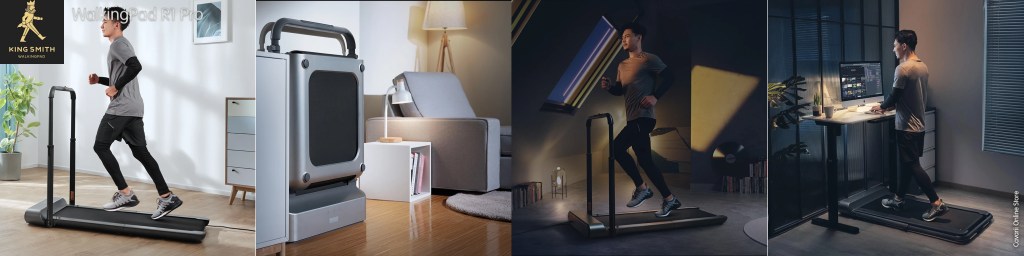
KingSmith WalkingPad – an intelligent foldable compact treadmills controlled by Apps

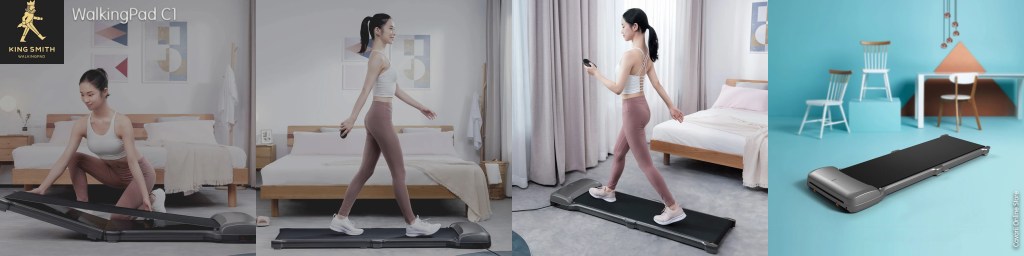
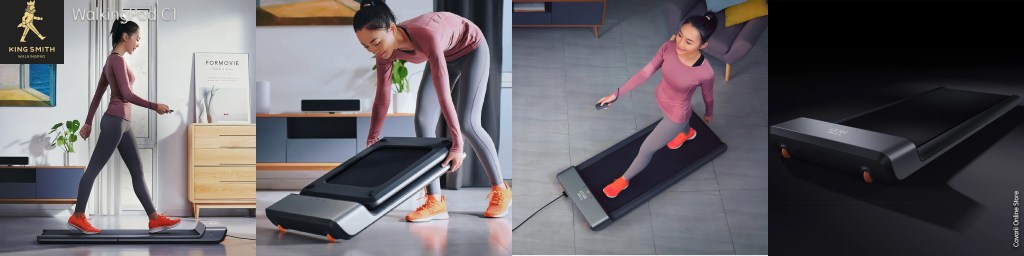
The WalkingPad supports synchronization with the Mijia application. It integrates into a “smart home” system, and can simultaneously be seen on Xiaomi TV during the workout. After training, the WalkingPad can be folded in half and slid under the sofa. The thickness of the track in the folded condition is only 12.9 cm, there is a wheel for easy and convenient transportation so you really don’t have to worry much about how to convey the walking Pad to its storage point.

KingSmith C1 – The Compact unit

KingSmith WalkingPad C1

KingSmith WalkingPad A1 & A1 pro

KingSmith WalkingPad A1 & A1 pro

KingSmith WalkingPad R1 Pro – The premium Model

KingSmith R1 Pro

Which model suit my need?

Comparing WalkingPad A1 Pro, C1, R1 and R1 Pro

Reviewing KingSmith WalkingPad C1

Reviewing KingSmith WalkingPad A1 & A1 Pro

Reviewing KingSmith WalkingPad R1 and R1 Pro

Comparing WalkingPad A1 Pro, C1, R1 and R1 PRO

Treadmill for Home 

KingSmith’s WalkingPad compact treadmill is perfect for home use. When the weather condition or air quality is poor outside, or you just don’t feel like going to the gym, a compact treadmill can save you from the guilty of sitting around at home. Wherever you live or however large your house is, a compact treadmill can be folded and put under the sofa or bed. You can walk, jog, or run while watching TV. It is also suitable for children and senior citizens. WalkingPad makes sports easier and achievable.

The WalkingPad is a compact treadmills product launched by Xiaomi Ecological Chain Enterprise. Because of its small size and good performance, the “walking board” can be fully folded and is very compact, and can be store easily under sofa, bed or cabinets.

The differences between various models

What are the differences between the few models? The following comparison chart gives an overview, follow by our comparison on some of the major features.

App use

A1 & A1 Pro is using Xiaomi’s Mijia App to manage the walking machine, being part of the Xiaomi Ecological Chain Enterprise, the Mijia app can control over a hundred different type of devices specially selected for the Xiaomi Ecological Chain Enterprise family

C1 is using WalkingPad’s own developed App, WalkingPad, and can manage only their own devices. The WalkingPad App is only in English and Chinese interface, while MiJia App is multi-language.

R1 & R1 PRO is using Kingsmith’s own KS Fit, which is a much better App than the WalkingPad App, with the latest course library design, a predefined exercise library where you can download and use.

Body build and shell design.

A1 Pro, R1 & and R1 PRO is build with integrated aluminium alloy, with an IML injection molding, which gives it a more premium product look. As for C1, it is assembled body built and shell cover is build from plastic.

Running Board

A1’s running board is built with high-density fibreboard while C1’s board is build from aluminium alloy, the R1 and R1 PRO’s board is padded with additional EVA soft layer, on top of the fibreboard.

Different appearance

Although the walking boards of the A1 and C1 can be folded, the appearance of the two is quite different.

The WalkingPad A1 is silver-gray in color, and A1 Pro is black, and the “walking” shape is more streamline and looks more stable.

The appearance of Walkingpad C1 is white. The front, middle and rear sides of the “walking platform” have protruding areas, which seem not that streamline.

R1 and R1 PRO’s walking board is wider than the rest.

WalkingPad R1 & R1 PRO

Different body parameters

The size of the Walkingpad C1 walking machine is 1449 (L) 528 (W) * 114 (H), the walking belt area (walking area) is 1200 (L) * 400 (W); C1 rated power is 588W, the speed range is 0.5km/h – 6km/h; the net weight of the product is 22kg, and the maximum load is 90kg (Note:first generation of C1 supported up to 110kg, but Kingsmith had since reduced the specs to 90kg).
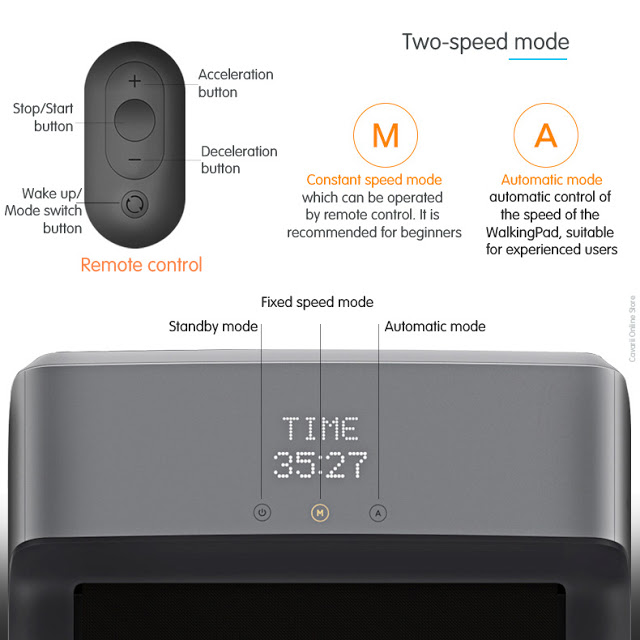
Compared with the two, the walking area of the Walkingpad C1 walking machine is slightly narrower, the motor power is also reduced a lot, the net weight of the body is also lighter, but it does not affect the maximum speed of the walking machine, and the bearing capacity is stronger. Some more, the performance is almost the same as the Walkingpad A1 walking machine.

The size of the Walkingpad R1 & R1 PRO walking machine is 1500 (L) 720 (W) * 90 (H), the walking belt area (walking area) is 1200 (L) * 440 (W); the widest among the 4 models. R1 rated power is 918W, or 1.5HP, the strongest among the 4 models. The speed range is 0.5km/h – 10km/h*; the net weight of the product is 33kg, and the maximum load is 110kg.

For R1 & R1 PRO, when the Armrest/handrail is horizontal, it will be in Running Mode, and speed can be up to 10KM/h, but it will only be in manual “M” mode, and speed control is via the Remote Control or App.

When the armrest/handrail is horizontal, the speed limit will be capped at 6 km/h, and can operate in both “M” and “A” modes.

Storage

A1, A1 Pro and C1 all need to be stored horizontally, under the sofa, table or bed. But R1 & R1 PRO can be stored vertically, and only take up 0.2 m ³

Different data display methods

The Walkingpad A1 & R1 can display the current status (manual, automatic or standby mode), exercise time and other information in front of the machine head, making it more convenient and intuitive to use.

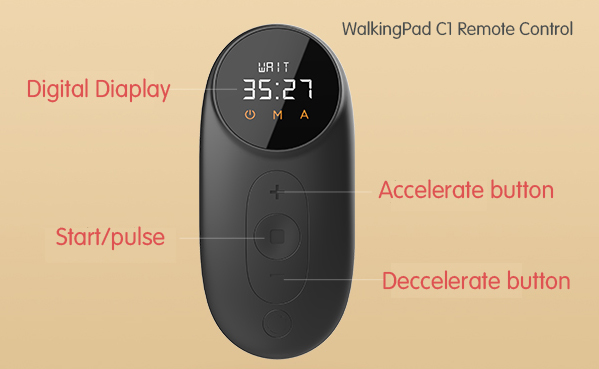
There is only one indicator light on the head of the Walkingpad C1 walking machine. The current state and movement time display function of the walking machine is designed on the remote control. To understand the movement time, the remote control should be held in the hand at all times. Inconvenience.

Which is better?

From the above comparison, the main difference between the two is the appearance, running belt width and load-bearing capacity, and other properties are basically the same (or have little effect on walking). Therefore, the Walkingpad C1 is more cost-effective and can be used by more heavy-duty athletes without paying attention to the appearance.

If you prefer a calm, atmospheric appearance, the WalkingPad A1 PRO is also good, although the price is a little more more expensive, but the running belt is wider and more comfortable to use; in addition, the driving power of the Walkingpad A1 is larger, and the load of the motor during operation is smaller. More durable.

The highest range R1 & R1 PRO is the best, as it offer both walking and running modes, and with speed up to 10 km/h. It also comes with a handrail build-in.

Improvements on A1 Pro over A1

A1 Pro can add on an optional Foldable Armrest
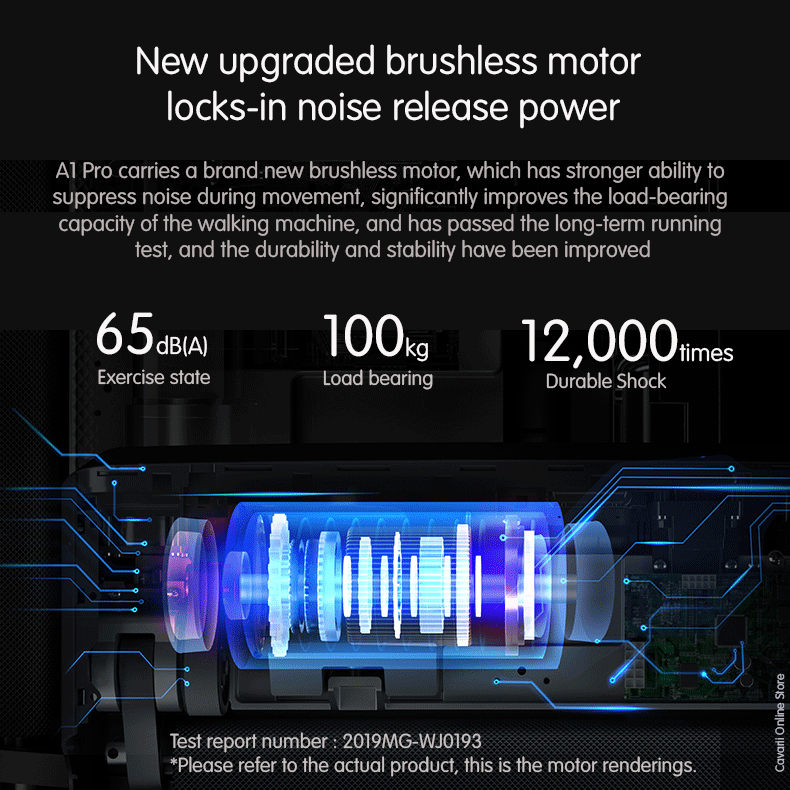
New brushless motor for A1 Pro

What’s the big differences between WalkingPad R1 and WalkingPad A1?

The big differences between R1 Pro and A1 are as below:

  • Speed limit: WalkingPad R1 Pro – 10km/h ; WalkingPad A1 – 6km/h
  • Weight capacity: WalkingPad R1 Pro – 110kg/242lbs ; WalkingPad A1 – 100kg/220lbs
  • Handrail: The WalkingPad R1 Pro has one, but the WalkingPad A1 doesn’t.
  • Safety key: The WalkingPadR1 Pro has one for running, but the WalkingPad A1 doesn’t.

Oral-B Smart Guide

Wireless SmartGuide for real-time guidance
The Oral-B Wireless SmartGuide gadget provides real time feedback directly from the toothbrush. The SmartGuide constantly provides information about the time spent brushing each quadrant, the Cleaning Mode that is being used and it even lights up if the user is brushing too hard. The individual gadget can be synchronized with any high-end Oral-B toothbrush, but only two of them can be calibrated at the same time.

The Smart Guide is a compact digital unit powered by 2 x AAA batteries that has been designed to placed in your bathroom.

It is essentially a visual tutor that encourages and guides you to do a better job when it comes to cleaning your teeth.

Acting as as a clock when not in use; but when you switch on one of Oral-B’s Bluetooth enabled brushes (no complicated pairing process required), the display is triggered and shows a timer and visual indicator. It provides real time feedback to you as you use the brush.

This timer counts up, how long you have been brushing your teeth for whilst showing what quadrant of the mouth you should be in.

It will also show the cleaning mode you are on via a symbol at the top of the display.

What it is, how it works & how you can use it with your Oral-B electric toothbrush

The above content was extracted from Electric Teeth UK

The principle behind it is to be a tool to you as you clean your teeth, to do so for the correct amount of time in total whilst spending the correct time on each quadrant and generally cleaning your teeth better.

A face appears within the quadrant guide with either a smile or a sad face depending on your performance.  Brush too hard and you get a sad face.  Brush for 2 minutes get a happy face.  

As you complete each quadrant a star appears at the bottom of the display. When all 4 quadrants are complete, 4 stars show.

The principle behind it is to be a tool to you as you clean your teeth, to do so for the correct amount of time in total whilst spending the correct time on each quadrant and generally cleaning your teeth better.

A face appears within the quadrant guide with either a smile or a sad face depending on your performance.  Brush too hard and you get a sad face.  Brush for 2 minutes get a happy face.

As you complete each quadrant a star appears at the bottom of the display. When all 4 quadrants are complete, 4 stars show.

Oral-B demonstrate and explain this themselves in their very own video